www.NavePoint.com 6 customerservice@navepoint.com
2. Equipment Installation
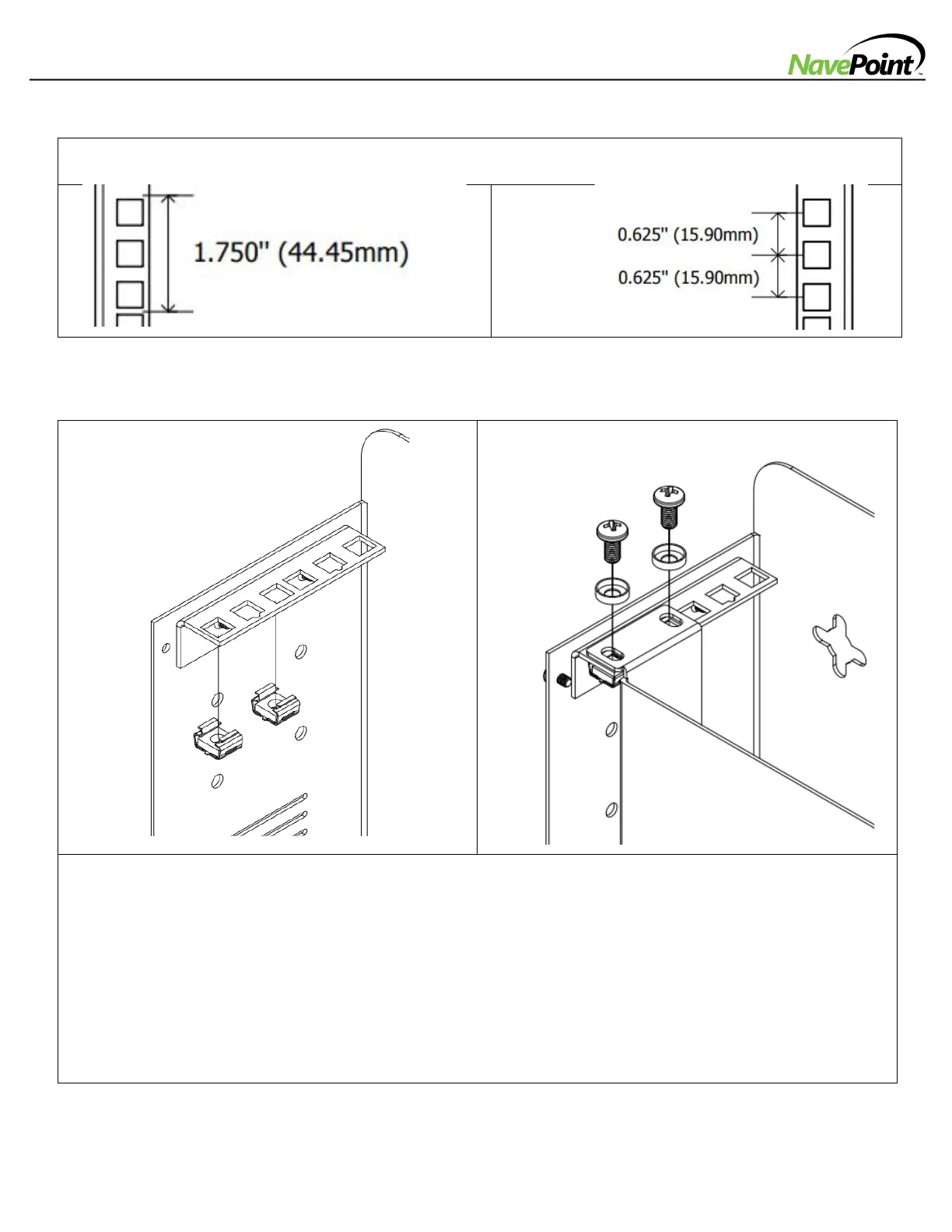
1. Install silver M6 Cage Nuts into the square openings to provide an attachment point for the silver M6 Mounting
Screws. Note: Consult your equipment documentation to determine how many cage nuts will be required and where
they will need to be installed.
a. From the inside of the Mounting Rails, insert one of the flanges of the cage nut through the square opening.
Press it against the side of the square opening.
b. Compress the cage nut at the sides slightly to allow the remaining flange to fit through the square opening.
When the cage nut is properly installed, both flanges will protrude through the square opening and will be
visible on the outer surface of the mounting rail. Repeat steps 1a and 1b until all required cage nuts are
installed.
2. After installing the required cage nuts, use the included black M6 Mounting Screws and M6 Washers to secure your
equipment into the installed M6 Cage Nuts.


 To Previous Page
 Loading...