EasyManua.ls Logo

NAVICOM RT-550 - User Manual

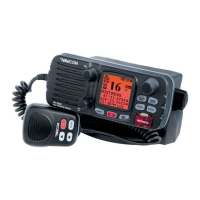
NAVICOM RT-550
21 pages
Print Icon
To Next Page IconTo Next Page
Loading...
RT-550 Marine Radio
25/1 Watt VHF/FM
OPERATOR WARNING
Navicom requires the radio operator to meet the requirements for Radio
Frequency Exposure. Unauthorized changes or modifications to this
equipment may void compliance with ETSI Rule. Any changes or
modification must approved in writing by Navicom.
This equipment has been tested and licensed to comply with the limits for Class
D Digital Marine Devices. These limits are designed to provide reasonable
protection against harmful interference in a residential installation.This equipment
can generate or radiate radio frequency energy and, if not installed and used in
accordance with the instructions, may cause harmful interference to radio
communications and human body. Never transmit before you make sure the
antenna is properly located.
This device is only an aid to navigation. Its performance can be affected by many
factors including equipment failure or defects, environmental condition and
improper handling or use. It is the user's responsibility to exercise common
prudence and navigational judgement, and this device should not be relied upon
as a substitute for such prudence and judgement. Your Navicom VHF radio
generates and radiates radio frequency (RF) electromagnetic energy (EME). This
equipment must be installed and operated in accordance with the instructions
contained in this handbook. Failure to do so can result in personal injury and/or
product malfunction.
Navicom RT-550
NAVICOM Conflans - Z.A. des Boutries, 78700 Conflans Ste Honorine - Tél : 01 39 72 19 90 Fax : 01 70 72 17 19
NAVICOM
Quimper - 3, rue J. Cugnot, Z.A.C du Petit Guelen, 29000 Quimper - Tél : 02.98.94.64.70 Fax : 02.98.94.69.71

Table of Contents

Question and Answer IconNeed help?

Do you have a question about the NAVICOM RT-550 and is the answer not in the manual?

Summary

Operator Warning

Equipment Description

Controls and LCD Display

2.1 Base Station (Panel)

Description of the front panel controls and their functions for the base station.

2.2 Base Station (Rear)

Identification of rear panel connectors and ports for the base station.

2.3 Handset

Explanation of the handset controls, including channel selection and PTT.

2.4 LCD Display

Details on the information displayed on the Liquid Crystal Display.

Installation

3.3 Connections

Instructions for connecting power supply, external speaker, and GPS equipment.

3.4 Mounting the Radio

Step-by-step guide for mounting the radio base station using the gimbal bracket.

Basic Operation

4.1 Transmission and Reception

Procedures for transmitting and receiving calls, including PTT usage.

Digital Selective Calling

5.2 DSC Call Types

Overview of different types of DSC calls that can be sent.

5.2.1 Sending a Distress Call

Procedure for initiating a distress call in emergency situations.

5.2.2 Send an All Ships Call

Steps to send an All Ships call for urgency, safety, or distress.

5.2.3 Send a Group Call

How to make a DSC call to a specific group of vessels.

5.2.4 Make a Routine Call (Individual)

Initiating a routine individual call to another vessel or station.

5.2.4.1 Manually Sending an Individual Call

Manual procedure to send an individual DSC call by entering MMSI.

5.2.4.2 Sending an Individual Call (MMSI Stored in Buddy List)

Sending an individual call using pre-stored contact information.

5.2.8 Pos Request and Pos Reply

Requesting and replying with vessel position information.

5.3 Receiving a DSC Call

Procedures for receiving various types of DSC calls.

5.3.1 Receiving Distress Call

Handling incoming distress calls and associated alerts.

5.3.2 Receiving a Distress ACK Send from a Coast Station

Receiving acknowledgment for a distress call from a coast station.

5.3.3 Distress Relay Call

Receiving and handling distress relay calls from other vessels.

5.3.4 Receiving an All Ships Call

Responding to and monitoring All Ships calls.

Setup Menu

6.7 GPS;Time

Configuring GPS and time display settings.

6.9 DSC Setup

Configuring the behavior of DSC and ATIS functions.

6.9.1 Enter Your User MMSI (User MMIS)

Entering the unique User MMSI for DSC operations.

NAVICOM RT-550 Specifications

General IconGeneral
Output power25W / 1W
Waterproof ratingIPX7
Voltage Range13.8 V DC
ChannelsInternational and USA
GPSBuilt-in

Related product manuals