www.naxa.com Page 7
MAX.
MIN.
AUX/
MP3-IN
FM
AM FM ST.
18
21
23
22
24
20
19
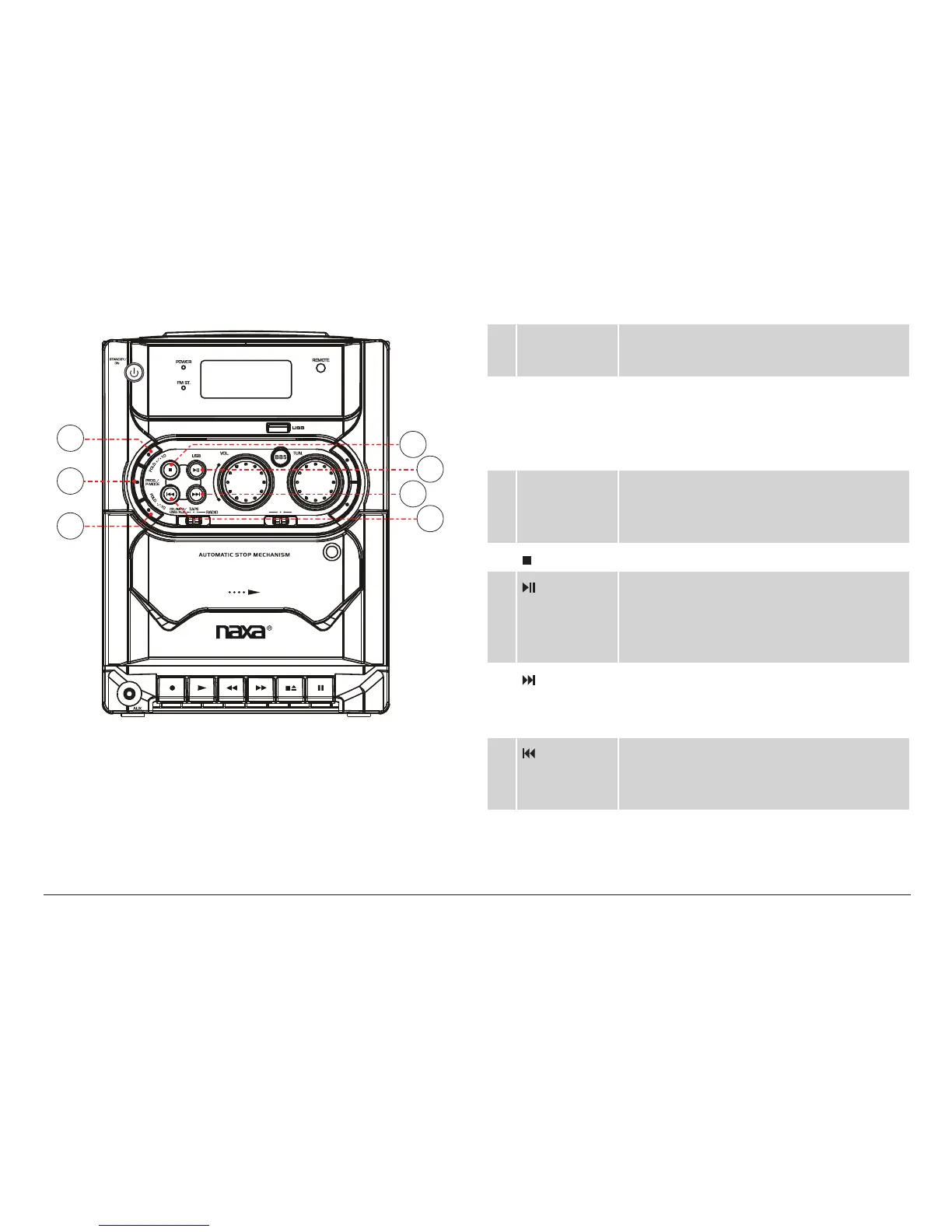
18 FOLD+/
+10 key
FOLD+: Skip to the next folder (MP3 only).
+10: Press to skip 10 tracks forward.
19 PROG/
P-MODE key
Program: Create a custom CD/MP3/USB
playlist. Press to enter Program mode.
P-MODE: Play mode. Press to change the
CD/MP3/USB repeat/playback mode.
20 FOLD–/
–10 key
FOLD–: Skip to the previous folder (MP3
only).
–10: Press to skip 10 tracks back.
21 key Stop: Press to stop CD/MP3/USB playback.
22 / USB key Play/Pause: Press to start, pause, or re-
sume CD/MP3/USB playback.
USB: Press and hold to switch to USB
mode.
23 key
(Next/
Forward)
Next: Press to skip to the next track.
Forward: Press and hold to scan quickly
forward through the current track.
24 key
(Previous/
Reverse)
Previous: Press to skip to the previous track.
Reverse: Press and hold to scan quickly in
reverse through the current track.


 To Next Page