Setting trip current:
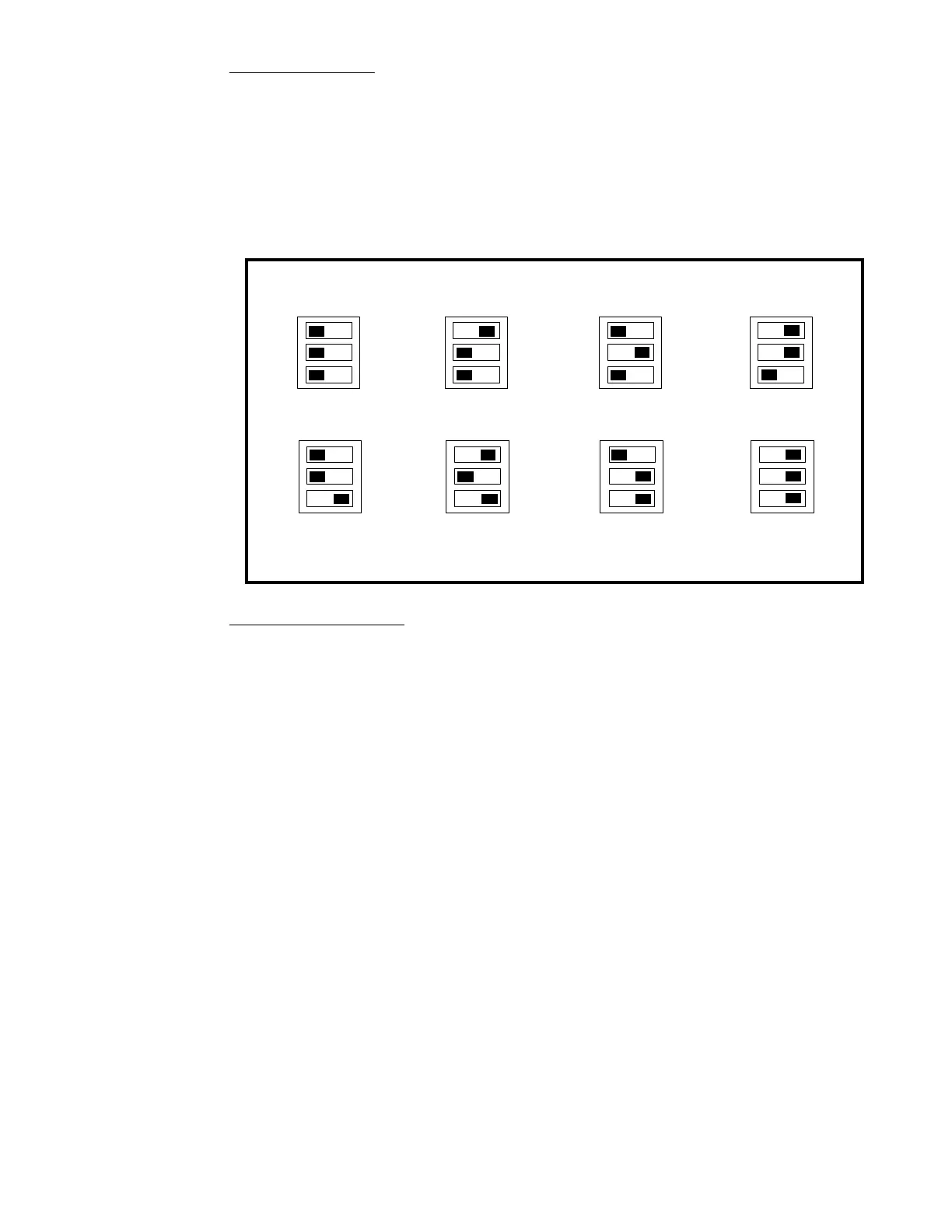
The AR10 comes from the factory with the trip current set to 1 Amp. You can set the trip
current higher by the switch positions below. If all switches are “off” (open) the trip current is
1 Amp. The diagram below illustrates the switch positions to set the trip current in 7
increments from 1 to 7 Amps. The 8th setting (all switches “on”) is for a custom trip current
setting. Factory default is 8 Amps. See CV settings for more information on the custom traip
current.
To change a switch position simply use your finger or a small screwdriver to slide the switch to
the desired position. The diagram below shows the settings.
Testing the installation:
After setting the trip current we recommend testing your wiring. The “quarter test” is the
fastest way to test your wiring. Use a coin or other piece of metal to short across the rails at
various places in reverse loop. The AR10 should trip and shut down the power district at
every place you short out the track. Once shut down the AR10 will try to restore power about
once every 2 seconds. If there is still a short the AR10 will kill the power again, until the short
is removed.
**Last revised: 3 May 2020 Page 3 AR10
TRIP CURRENT SWITCH SETTINGS
Black "square" indicates position of the each switch
1 AMP 4 AMP 3 AMP 2 AMP
5 AMP
CUSTOM
7 AMP 6 AMP
TRIP CURRENT
1
2
3
1
2
3
1
2
3
1
2
3
1
2
3
1
2
3
1
2
3
1
2
3



 To Next Page