EasyManua.ls Logo

NCE LED24TV - Remote Control

Default Icon
38 pages
Print Icon
To Next Page IconTo Next Page
To Previous Page IconTo Previous Page
Loading...
User
Guidance
Information
Remote
Control
eFunctions of
remote control buttons
The
remote
control
is using
InfraRed (IR)
Point
it
towards the
front
of
the
TV The
remote
control
may
not
work
correctly
if
it
is
operated
out
of
range or
out
of
angle
113100
Duo
BOO
MB
0
13:
INPUT
1=1 C:1
1:11 ICI C:1
11111 MD
ES
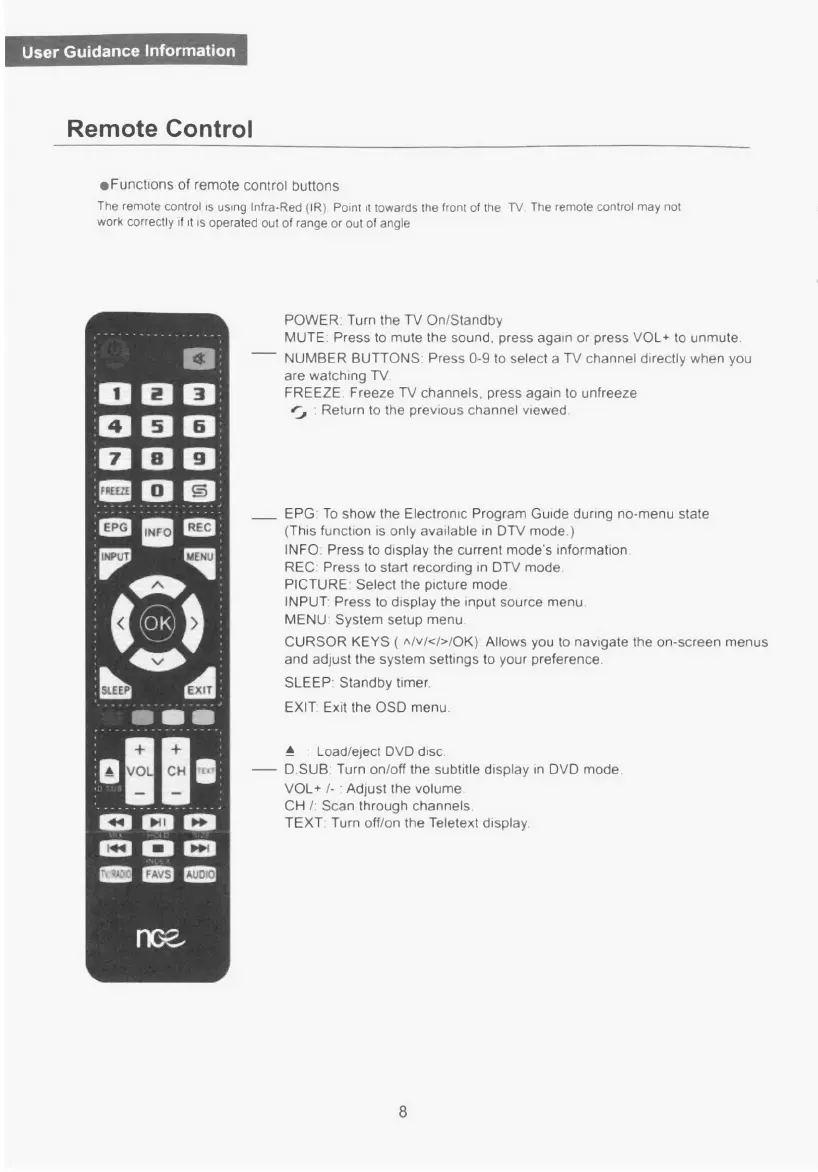
POWER Turn
the
TV On/Standby
MUTE. Press
to mute
the sound.
press again or
press
VOL*
to
unmute.
NUMBER BUTTONS: Press 0−9
to
select
a
TV
channel directly when
you
are
watching
TV
FREEZE. Freeze TV
channels,
press
again
to
unfreeze
e−
Return
to
the
previous
channel viewed.
'
EPG:
To
show the
Electronic Program Guide
during
nomenu
state
(This function
is
only
available
in
DTV
mode.)
INFO. Press
to
display the
current
mode's
information
REC: Press
to start
recording
in
DTV
mode.
PICTURE: Select
the picture mode.
INPUT. Press
to
display the
input
source menu
MENU System
setup
menu
CURSOR KEYS
(
A/v/</>/0K).
Allows
you
to navigate
the
onscreen
menus
and adjust the
system
settings
to
your
preference.
SLEEP: Standby
timer.
EXIT. Exit
the
OSD
menu.
A
Load/eject
DVD
disc
aSUB Turn on/off
the
subtitle
display
in
DVD
mode.
VOL*
/−
Adjust
the volume
CH
/:
Scan
through channels:
TEXT
Turn
off/on
the
Teletext
display.
8

Related product manuals