EasyManua.ls Logo

NCE LED24TV - Page 22

Default Icon
38 pages
Print Icon
To Next Page IconTo Next Page
To Previous Page IconTo Previous Page
Loading...
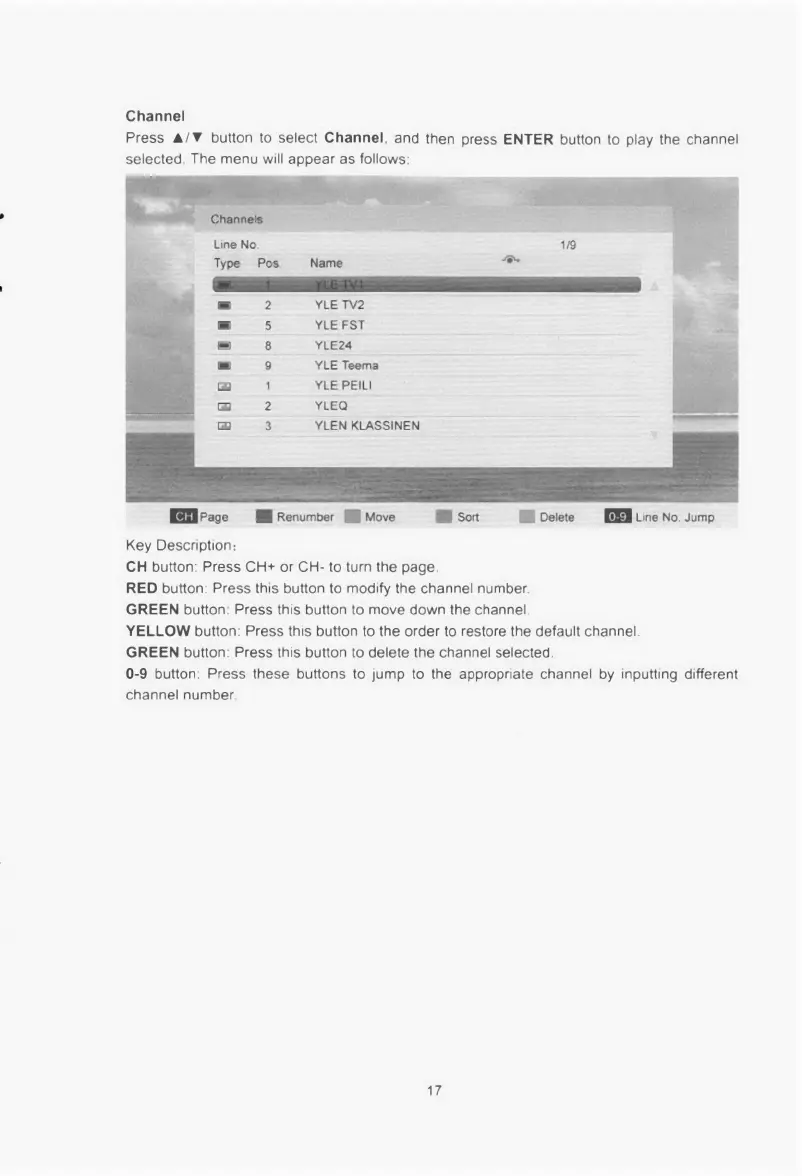
Channel
Press
•/•
button
to
select
Channel,
and
then
press
ENTER
button
to
play the
channel
selected.
The
menu
will
appear as
follows.
1311111111111.10
Line
No
Type Pos Name
I•
2
YLE TV2
5
YLE FST
8 YLE24
9
YLE Teema
119
1
YLE PEILI
GU
2
YLEQ
3
YLEN KLASSINEN
1111Page
II
Renumber
•Move •Sort NI
Delete
In
Line
No.
Jump
Key Description:
CH
button:
Press CH+
or
CH
to
turn
the
page.
RED
button.
Press
this button
to
modify
the channel number.
GREEN
button:
Press
this button
to
move
down the
channel
YELLOW
button:
Press
this button
to
the order
to
restore
the
default
channel.
GREEN
button:
Press
this button
to
delete the
channel selected.
0−9
button:
Press
these buttons
to
jump
to
the appropriate channel by inputting
different
channel number.
17

Related product manuals