4
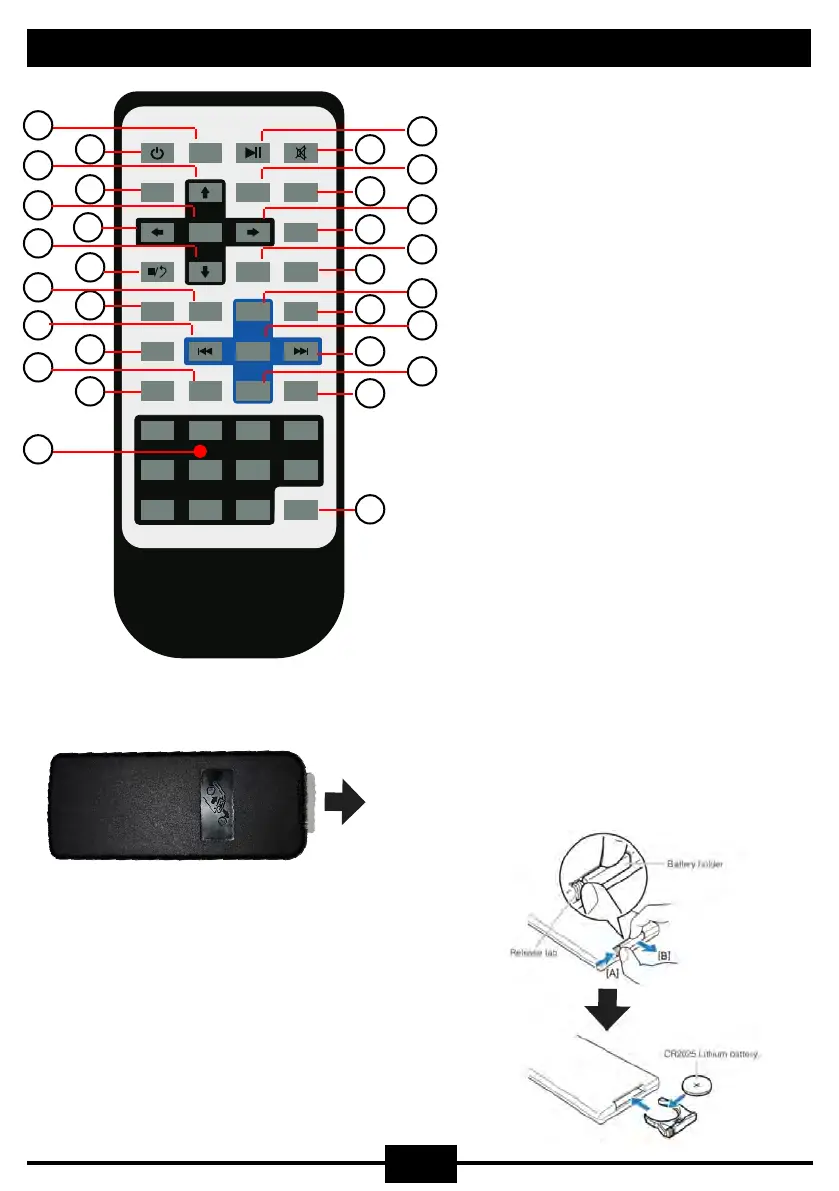
Remote Control
AMSRPT
LOC/AF
RDM
PBC OSD
GOTO
1 2
3
4
5
6 7 8
9 10+0
BND/TA
TFT/OFF
ST
MODE
VOL+
ZOOM
SEEK-
PROG
SEEK+
VOL-
AUDIO
TITLE
SUB-T
ENTER
SETUP
ANGLE
SLOW
IN OUT
ALL
SYS
SEL
1
2
3
4
5
6
7
8
9
10
11
12
13
14
15
16
17
18
19
20
21
22
23
24
25
26
27
28
29
30
1. Mode/Source
2. Power On/Off
3. Menu Cursor Up
4. System/Radio Band AM/FM
5. Menu Enter/Hold All Speakers
6. Menu Cursor Left/Hold Internal Speaker
7. Menu Cursor Down
8. Stop/Return
9. Program/Radio Stereo/Mono
10. Repeat Mode
11. Previous Chapter/Track/Radio Seek
12. Random Playing Order
13. On Screen Display
14. No Function
15. Digit Area
16. Play/Pause
17. Mute
18. Disc Title Menu
19. Disc Sub-Title
20. Menu Cursor Right/Hold External Speaker
21. System Setup
22. Video Angle
23. Slow Play
24. Volume/Adjust Up
25. Image Zoom
26. Sound Select
27. Next Chapter/Track/Radio Seek
28. Volume/Adjust Down
29. Audio Stereo/Mono
30. Direct Access Mode
Battery Replacement: (CR2025)
Press and hold the release tab firmly in the direction
indicated by (A), and slowly slide the battery holder
out in the direction indicated by (B)
Remove Plastic Protector:
WARNING:
This remote control contains a coin/button cell
battery inside. Keep batteries out of reach of
children.
Swallowing may lead to serious injury or death
in as little as 2 hours due to internal burns.
Seek medical treatment immediately if swallowed


 To Next Page