
 Need help?
Do you have a question about the NCM NCMO-5G4W10CW and is the answer not in the manual?
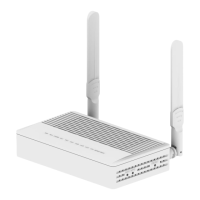
Detailed explanation of the NCM-5G4W10CW GPON ONU and its carrier-class FTTH application.
Lists the features like 1GE3FE, WiFi, and CATV for the NCM-2G4W10CW model.
Outlines the primary functions: Fiber internet, LAN Ethernet, WiFi connectivity, and CATV RF interface.
Details GPON interface (port, sensitivity, power, distance), wavelength, optical interface, and LAN interface ports.
Covers CATV interface (RF power, frequency, impedance) and Wireless (802.11b/g/n, frequency, MIMO, antenna).
Lists operating conditions, storing conditions, power supply, consumption, dimension, and net weight.
Explains the status and meaning of LEDs for Power, PON, LOS, SYS, WiFi, WPS, LAN, and CATV.
Lists the items included in the product packaging: ONU, power adapter, and user manual.
Provides instructions for installing the ONU equipment on a desktop or wall.
Details necessary precautions to avoid equipment damage and personal injury during installation.
Specifies the required interior environment and electromagnetic considerations for ONU installation.
Describes optional cable connections for different models, including the rear view of ports.
Introduces web management functions like device info, IP address modification, file backup, and firmware upgrade.
Displays the default web login interface with fields for username and password.
Shows the device's basic information including type, model, MAC, SN, and software versions.
Displays the current WAN connection information, including status, mode, and IP address.
Covers WLAN configuration, including SSID name, SSID enable, and advanced settings.
Explains how to restart the device and restore it to factory default settings.
Details the process for upgrading the device software via the web interface.
Addresses problems related to power connection, abnormal voltage, and LAN LED not lighting.
Solves issues with LOS LED blinking and PON LED flashing, likely related to fiber optic connections.
Explains reasons and solutions for the ONU stopping working, focusing on power supply and overheating.

 To Next Page
 General