Overview
4
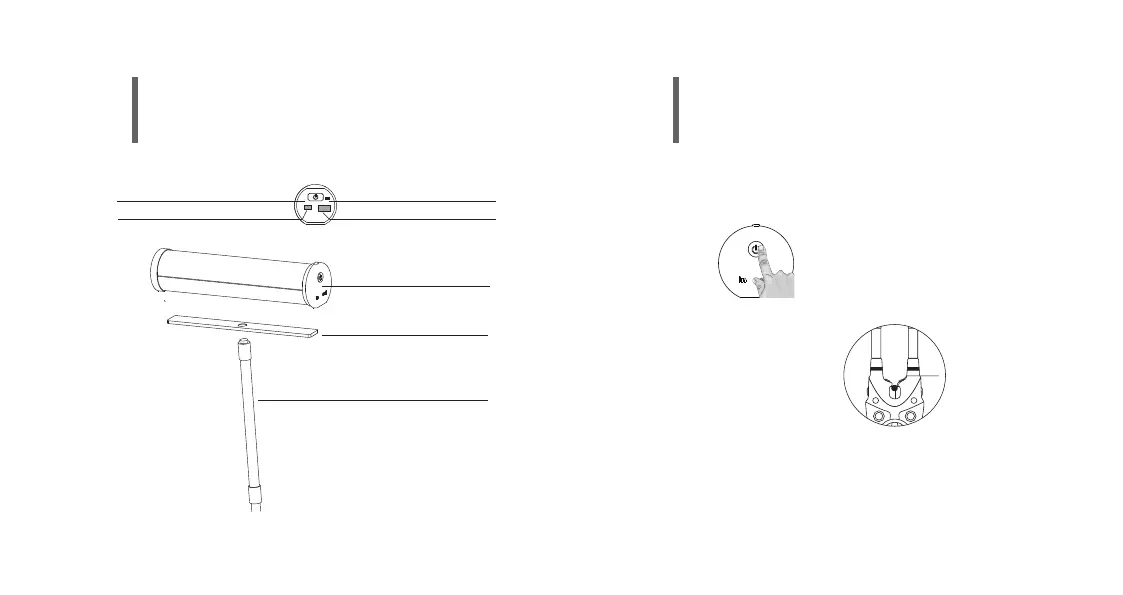
Bivvy Light Pro
Adaptor Plate for Bivvy
Gooseneck for bank stick
Power on/off & Mode Button
Power IN Power OUT
LOW POWER INDICATOR
5
•Double click on the button on the bivvy light. The colours will loop and flash.
•One click to choose a colour channel (red=alarm1, green=alarm2,
blue=alarm3,yellow=alarm4,
white=alarm 5,purple=th9s,
super white=smart band)
•Once you have found your colour channel, please turn the roller
wheel on the bite alarm
•The light will shortly flash if the process was sucessfull
Note: You can register only one bite alarm at one colour. So you must
register each bite alarm on a different colour.
Register your your bivvy light pro with a bite alarm (K9s, S9)
Register Mode


 To Next Page