EasyManua.ls Logo

NEC MultiSync X464UNS - User Manual

NEC MultiSync X464UNS
57 pages
Print Icon
To Next Page IconTo Next Page
Loading...
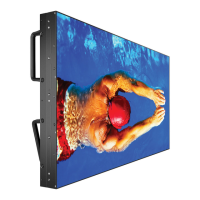
MultiSync X464UN
MultiSync X464UNS
MultiSync X464UNV
MultiSync X554UN
MultiSync X554UNS
MultiSync X554UNV
Please fi nd your model name in the label on the backside of monitor.
Large Format Display
User’s Manual

Other manuals for NEC MultiSync X464UNS

Questions and Answers

  • K
    Karen JacksonAug 20, 2025
    How to adjust display image size on NEC MultiSync X464UNS?
    • S
      Steven StewartAug 20, 2025
      If the display image on your NEC monitor is not sized properly: * Use the OSD Image Adjust controls to increase or decrease the coarse adjustment. * Make sure that a supported mode has been selected on the display card or system being used.
  • M
    Michael JohnsonAug 22, 2025
    How to fix selected resolution not displayed properly on NEC MultiSync X464UNS?
    • D
      Dylan MillerAug 22, 2025
      To fix the selected resolution not being displayed properly on your NEC monitor, use the OSD Display Mode to enter the Information menu and confirm that the appropriate resolution has been selected. If not, select the corresponding option.
  • H
    Heather ColeAug 25, 2025
    How to fix no picture on my NEC MultiSync X464UNS?
    • A
      Angela TownsendAug 25, 2025
      If there is no picture on your NEC monitor, ensure the following: * The signal cable is completely connected to the display card/computer. * The display card is completely seated in its slot. * The main Power Switch is in the ON position. * The Front Power Switch and computer power switch are in the ON position. * A supported mode has been selected on the display card or system. * The monitor and display card are compatible with recommended settings. * The signal cable connector has no bent or pushed-in pins. * If the monitor went into OFF mode after signal loss, press the power button.
  • F
    fjohnsAug 26, 2025
    Why is the LED on my NEC MultiSync X464UNS not lit?
    • C
      clarence52Aug 26, 2025
      If the LED on your NEC monitor isn't lit (no green or red color), make sure that: * The Power Switch is in the ON position and the power cord is connected. * The main Power Switch is in the ON position. * The computer is not in a power-saving mode (touch the keyboard or mouse). * The power indicator option in the OSD is set to ON.
  • M
    Ms. Angela JenkinsAug 28, 2025
    What to do if the power button does not respond on NEC MultiSync X464UNS?
    • P
      Patricia SolisAug 28, 2025
      If the power button on your NEC monitor isn't responding, try these steps: * Unplug the power cord of the monitor from the AC outlet to turn off and reset the monitor. * Check the main Power Switch on the back side of the monitor to ensure it is in the ON position.
  • H
    Holly ShannonAug 30, 2025
    How to fix unstable image on NEC MultiSync X464UNS Monitor?
    • L
      loganderrickAug 30, 2025
      If the image on your NEC monitor is unstable, unfocused, or swimming, try these solutions: * Ensure the signal cable is completely attached to the computer. * Use the OSD Image Adjust controls to focus and adjust the display by increasing or decreasing the fine adjustment. * Check the monitor and your display card with respect to compatibility and recommended signal timings. * If your text is garbled, change the video mode to noninterlace and use a 60Hz refresh rate.
  • T
    terrysarahSep 1, 2025
    Why is there no sound from my NEC Monitor?
    • K
      kathleen74Sep 1, 2025
      If there is no sound from your NEC monitor, check the following: * The audio cable is properly connected. * Mute is not activated. * The volume is not set at minimum. * The computer supports an audio signal through DisplayPort. * SURROUND is OFF. * The Internal/External speaker switch is properly set.
  • J
    Jennifer MartinezSep 3, 2025
    Why is the red LED blinking on my NEC MultiSync X464UNS Monitor?
    • B
      Brandi FigueroaSep 3, 2025
      If the red LED on your NEC monitor is blinking, it indicates the monitor is powered off due to the internal temperature being higher than the normal operating temperature. The RED LED will blink six times. Allow the monitor to cool down to normal operating temperature before powering it on again.
  • R
    rodney79Sep 5, 2025
    Why is the remote control not working on my NEC MultiSync X464UNS Monitor?
    • C
      Cody WestSep 5, 2025
      If the remote control is not working with your NEC monitor, check the following: * The Remote Control’s batteries status. * The batteries are inserted correctly. * The Remote Control is pointing at the monitor’s remote sensor. * The IR LOCK SETTING status. * The remote control system may not function when direct sunlight or strong illumination strikes the remote control sensor of the LCD monitor, or when there is an object in the path.
  • N
    Nicholas HarrisSep 7, 2025
    How to resolve image persistence on NEC MultiSync X464UNS?
    • Q
      qnicholsSep 7, 2025
      To alleviate image persistence on your NEC monitor, turn off the monitor for as long as the previous image was displayed. For example, if an image was on the monitor for one hour and a residual image remains, the monitor should be turned off for one hour to erase the image.

NEC MultiSync X464UNS Specifications

General IconGeneral
Screen Size46 inches
Resolution1920 x 1080
Brightness700 cd/m²
Viewing Angle (H/V)178°/178°
Response Time8 ms (gray-to-gray)
Aspect Ratio16:9
ConnectivityDVI-D, HDMI, DisplayPort, VGA
Input ConnectorsHDMI, DisplayPort, DVI-D, VGA
Weight22.5 kg
Contrast Ratio4000:1
Panel TechnologyIPS
Panel TypeIPS

Related product manuals