Need help?
Do you have a question about the Nectar Hive and is the answer not in the manual?
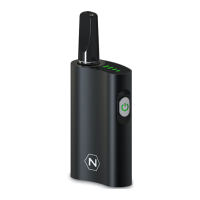
The removable cartridge that holds the e-liquid and heating coil for vaporisation.
Ports on the device that allow air to be drawn in during use.
The primary housing of the device, containing the battery and electronics.
The port used to recharge the device's battery.
Visual indicator light(s) on the device displaying status information.
Physical size of the device: 13cm x 9.6cm x 2.8cm.
Available finish for the device: Matte Black.
Suitable liquids include Thin Oils & Thick Oils (Eliquid/CBD*/THC*).
The volume the pod can hold: 2ml.
The total weight of the device: 100g.
Internal battery size: 1000mAh (20A).
Features a Ceramic Coil (1.0 Ohm) with a 1.6mm Intake Hole.
Construction material of the device: Aluminium.
White LED lights up for the duration of each draw.
Red LED indicator flashes 3 times.
Red LED indicator lights up for the duration of the charge.
Red LED indicator turns green when fully charged.
Pull out the lower-end silicone plug on the pod's side to access the refilling hole.
Fill the pod to 80% capacity and secure the plug to prevent leakage.
Insert the pod; device vibrates and LEDs flash white upon successful connection.
Inhale gently through the mouthpiece to activate; no buttons are required.
Wait 5 mins for coil saturation; replace pods after 3-5 uses for optimal performance.
Draw gently to avoid e-liquid intake; always use the device in an upright position.
Step 1: Provide your personal information for warranty registration.
Step 2: Enter your order details for warranty activation.
Step 3: Complete the process to confirm your 2-year warranty.
Recharge every 3 months to maintain battery performance during long periods of inactivity.
Empty or seal refillable pods during flights to prevent leakage due to pressure changes.
Wipe condensation away; turn pod upside down and shake lightly to resolve.
Check local laws for legality and minimum age for using device with extracts.
Access a 10-minute 'How to Use' video guide via QR code.
Scan QR code to subscribe to the official Nectar YouTube channel.
Contact via +44 773 2415 188; average response time 0.5 hours.
Contact via info@nectarmedicalvapes.com; average response time 2 hours.
Contact via +44 207 050 0737; average response time 30 seconds.
The Nectar Hive is a refillable vape kit designed to allow users to utilize the benefits of cannabinoids while eliminating the intake of toxins and carcinogens. Nectar strives for 100% customer satisfaction and offers support via WhatsApp, email, and telephone, with varying response times.
The Nectar Hive kit includes:
Vaping Oils (Eliquids/CBD/THC):**
Nectar offers a 2-year warranty. Users can register their device and activate the warranty by following a three-step process (Personal Details, Order Information, Confirm) via a QR code or the website: nectarmedicalvapes.com/warranty/.
YouTube support is available with videos on "How to Use" (10 mins length) and a channel subscription option, accessible via QR codes. Customer support is also available via WhatsApp (+44 773 2415 188, Avg. Response: 0.5 hours), Email (info@nectarmedicalvapes.com, Avg. Response: 2 hours), and Telephone (+44 207 050 0737, Avg. Response: 30 seconds).
 General
| Brand | Nectar |
|---|---|
| Model | Hive |
| Category | Electronic Cigarettes |
| Language | English |

 To Next Page