EN
08
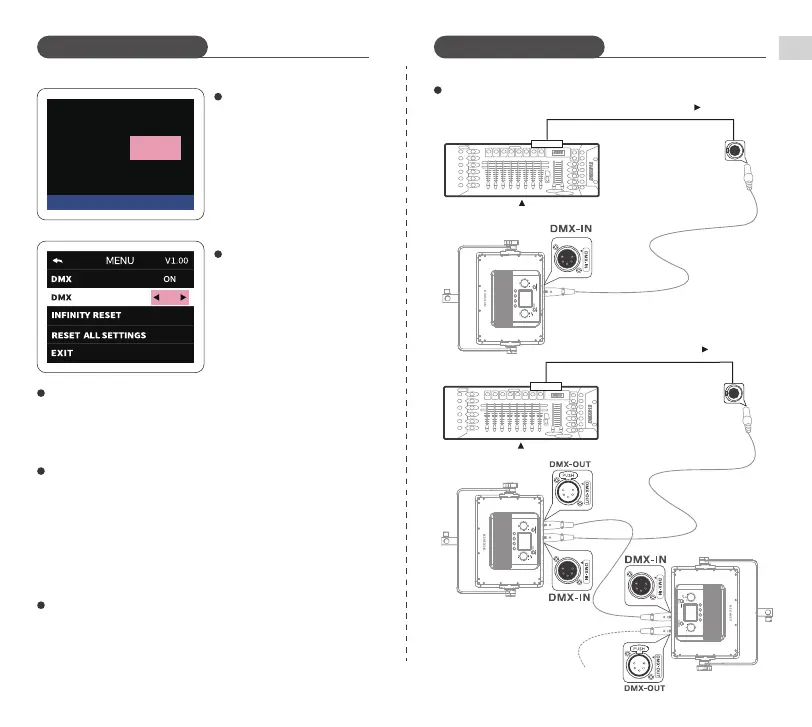
DMX connection (when
connecting to a console)
To access the MENU interface,
simply perform a long press on the
MODE/MENU key. From there,
choose the DMX option and set it to
ON. Next, connect the DMX
connection cable as depicted on
the left side of the diagram. Once
these steps are completed, you will
gain access to the DMX console.
DMX connected
DMX:006
Disconnecting from the DMX console
Channel Selection:
◎ Unplug the cable connecting the DMX console and the light.
◎ Long press MODE/MENU Button to enter the MENU interface and set the
DMX status as "OFF".
ADDR
001
DMX Channel Settings (when
connecting to a console)
When in the DMX connection
interface, you can directly set
channels by turning the SET Dial.
◎
Long press MODE/MENU Button
to enter the MENU interface.
Select DMX ADDR to set channels.
◎
*In DMX mode, the control channel is 1 by default.
*In DMX mode, the available channels are 1-512.
*If the DMX signal is lost, the light will recall the last signal used.
DMX console control:
※ In DMX mode, please refer to the "PL60C DMX Channel Table" appendix
for related control schemes.
1. Connect the DMX cable to DMX console.
2. Connect the DMX cable to light.
One console connection
OUTPUT
DMX512
Multiple console connection
OUTPUT
DMX512
DMX connection diagraph
Operating Instructions Operating Instructions
When DMX is activated, you can connect to the console. Set the console on
a matching DMX channel, and it will allow you to perform various function
modifications. This setup is suitable for connecting one or multiple
consoles.
5
4
3
2
5
4
3
2
5
4
3
2


 To Next Page
 Loading...