en HomeConnect
20
HomeConnect services in your coun-
try. You can find information about
this at: www.home-connect.com.
To be able to use HomeConnect,
you must first set up the connection
to the WLAN home network (Wi-Fi
1
)
and to the HomeConnect app.
After switching on the appliance, wait
at least 2minutes until internal
device initialisation is complete. Only
then should you set up HomeCon-
nect.
The HomeConnect app guides you
through the entire login process. Fol-
low the instructions in the HomeCon-
nect app to configure the settings.
Tips
¡ Please consult the documents sup-
plied by HomeConnect.
¡ Please also follow the instructions
in the HomeConnect app.
Notes
¡ Please note the safety precautions
in this instruction manual and
make sure that they are also ob-
served when operating the appli-
ance via the HomeConnect app.
→"Safety", Page4
¡ Operating the appliance on the ap-
pliance itself always takes priority.
During this time it is not possible
to operate the appliance using the
HomeConnect app.
10.1 Setting up HomeCon-
nect
Requirement:The HomeCon-
nectapp has been installed on your
mobile device.
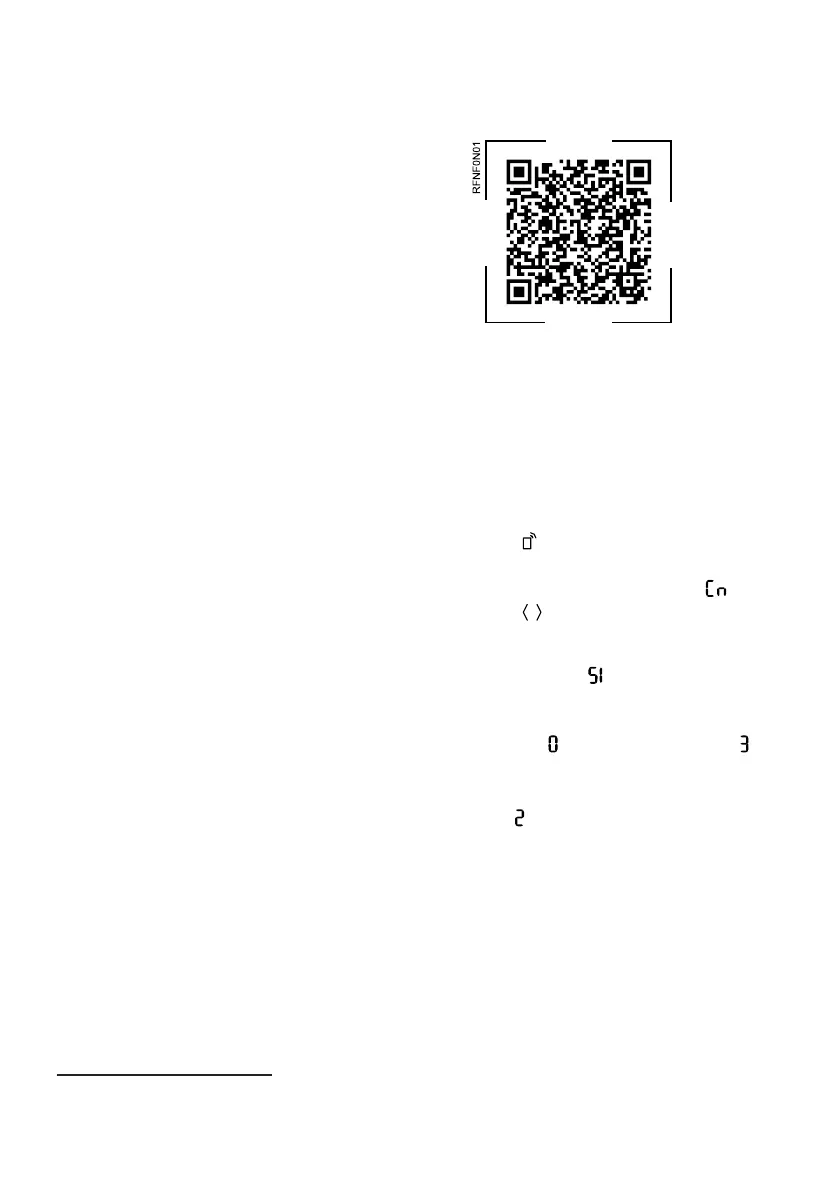
1. Scan the QR code using the
HomeConnectapp.
2. Follow the instructions in the
HomeConnectapp.
10.2 Checking the signal
strength
You should check the signal strength
if no connection could be estab-
lished.
1. Press .
a The temperature display (refriger-
ator compartment) shows .
2. Press / (Refrigerator compart-
ment) repeatedly until the temper-
ature display(refrigerator compart-
ment) shows .
a The temperature display (freezer
compartment) shows a value
between (no reception) and (full
reception).
Note:The signal strength should be
at least .
Improving the reception
If the signal strength is too weak, the
connection may be interrupted.
▶ Carry out one of the solution op-
tions:
‒ Place the router and refrigerator
closer together.
1
Wi-Fi is a registered trademark of the Wi-Fi Alliance.



 To Next Page