Basic settings en
39
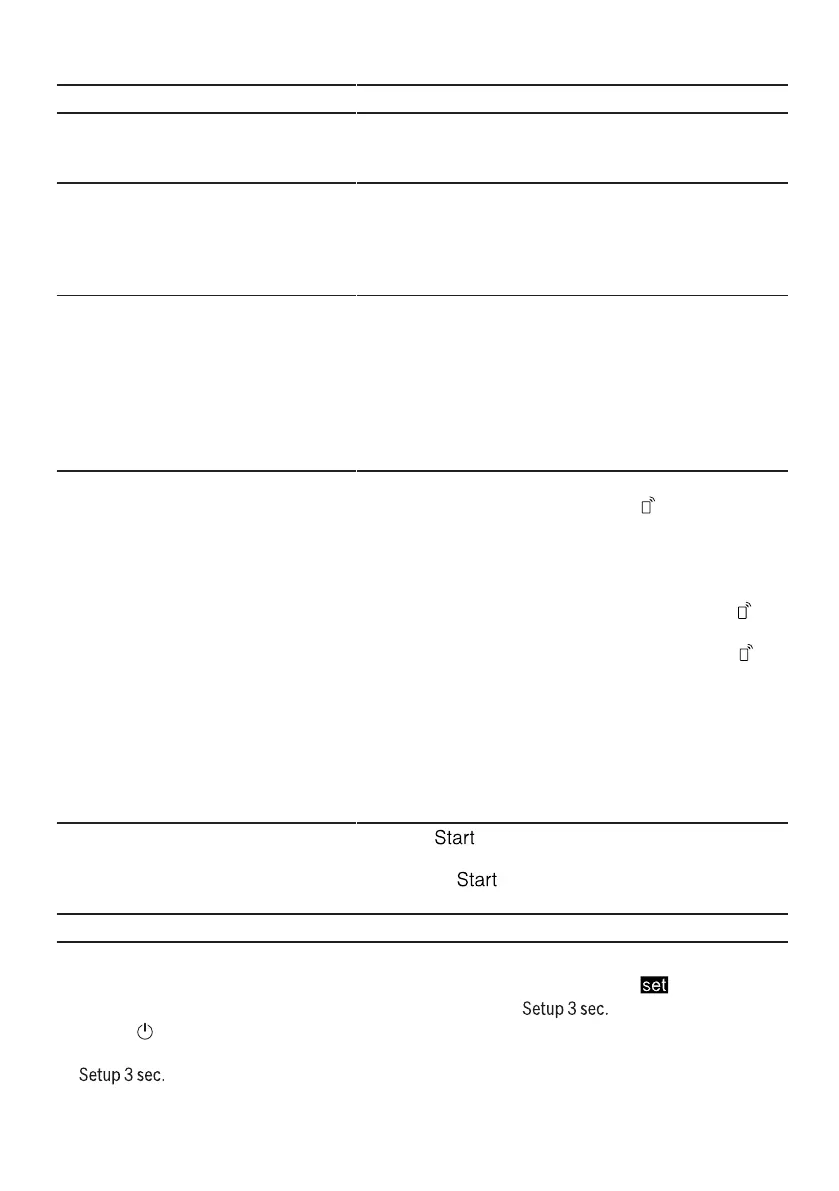
Basic setting Display text Selection Description
Button volume bL:02
1
bL:00 - bL:03 Set the button volume during opera-
tion. Level "bL:00" switches the but-
ton tones off.
Childproof lock c:00
1
c:00 - c:01 Switch the
→"Electric childproof lock",
Page12 on or off.
Level "c:00" switches the childproof
lock off.
Wi-Fi Cn:00 Cn:00 - Cn:01 Switch the wireless network connec-
tion on or off.
Level "Cn:00" switches the wireless
network connection off.
The basic setting "Wi-Fi" is only avail-
able once the appliance is connec-
ted to the HomeConnect app.
→"HomeConnect ", Page40
Remote Start rc:01 rc:00 - rc:02 Activate or deactivate
→"Remote Start ", Page41.
The following settings are possible:
¡ With the setting "rc:00", the func-
tion is permanently deactivated.
¡ With the setting "rc:01", the func-
tion can be selected via the
button.
→"Activating Remote Start ",
Page41
¡ With the setting "rc:02", the func-
tion is permanently activated.
This basic setting is not available un-
til after you have connected the
device with the HomeConnect app.
→"HomeConnect ", Page40
Factory setting rE: Start with
Y:ES
Confirm with
Restore changed settings to the fact-
ory settings.
The settings for initial start-up must
be configured.
1
Factory setting (may vary according to model)
Changing basic settings
1. Open the appliance door.
2. Press .
3. To open the basic settings, press
for 3 seconds.
a The display shows H:xx.
a The display shows .
4. Press repeatedly until
the display shows the required set-
ting.


 To Next Page