Version: 5.0
28.08.2017
8
KEN001BT55
EN
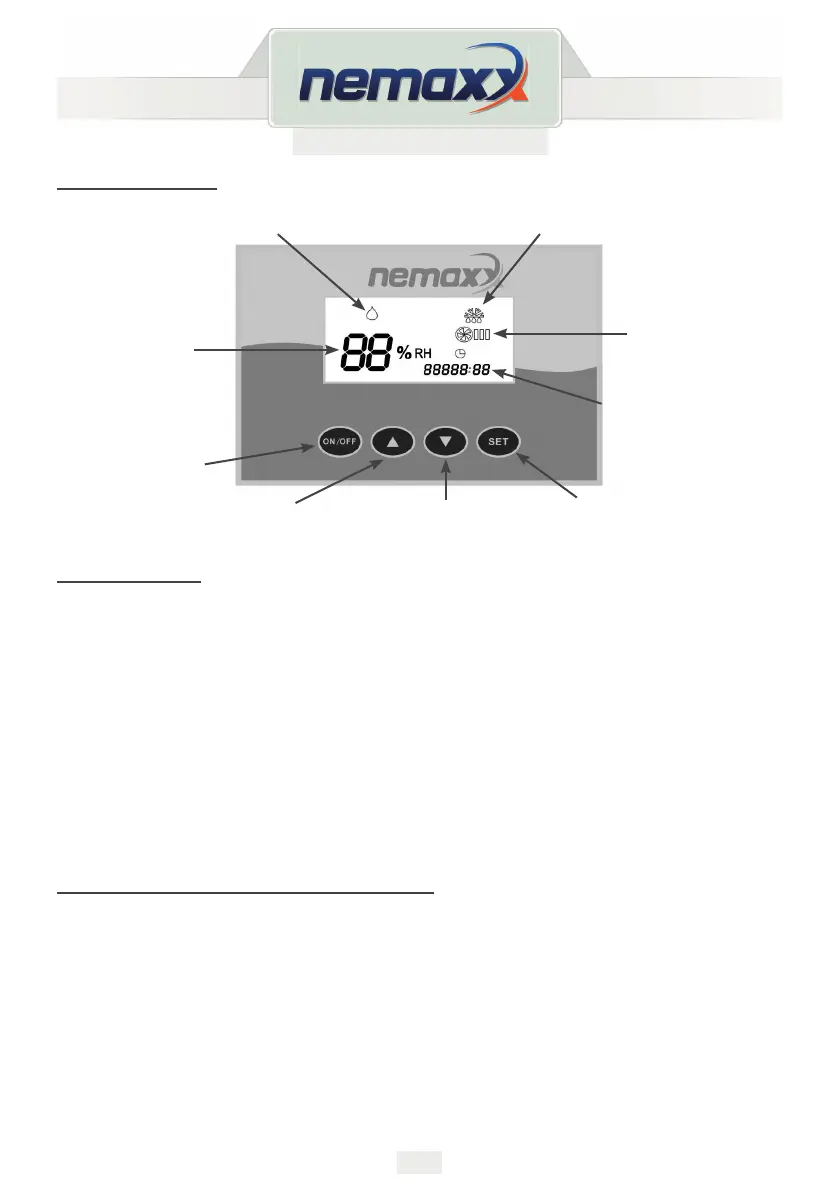
CONTROL PANEL
Button functions
A. ON/OFF button:
each time you press this button, the controller will follow“ ON-OFF-ON“ cycle.
B. Reducing humidity button:
under the humidifying mode, each time you press this button, the humidity will reduce by 1%,
if you hold this button for 2 seconds, the humidity will reduce 5% per second.
C. Increasing humidity button:
under the humidifying mode, each time press this button, the humidity will increase 1%,
if you hold this button for 2 seconds , the humidity will increase 5% per second.
D. Set button:
press each time, enter humidity setting / timing setting / fan speed setting / exit setting
cycle.
Operationalguides(dehumidicationmode)
1. Plug into the socket, the machine will issue a „tick“ sound.
2. „Dehumidification icon“ will light up.
3. The initial setting dehumidification humidity is 60%.
4. Dehumidification setting range is between 30% - 90%.
5. The humidity / timing / fan speed can be adjusted by pressing either “▲“ or „▼“.
6. When the setting humidity is 30%, you needs to press „▼“ button, the machine will
continue dehumidification mode for 24 hours, the screen will show humidity „CO“.
7. When you are setting the humidity level, the display will show the current value
5 seconds after the adjustment.
Dehumidication icon
Humidity
display
Total running time
display
Decrease
humidity
ON / OFF
button
Increase
humidity
Defrost icon
Fan icon
Set button



 To Next Page