16
neo-tools.comneo-tools.com neo-tools.comneo-tools.com
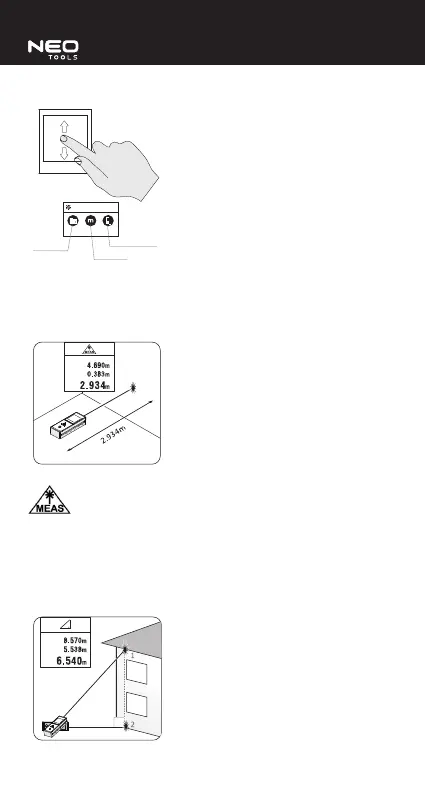
Scrolling up/down allows to enter measurement settings. Click an icon to
navigate to corresponding function.
a)
b)
c)
a. stored measurements,
b. change of unit,
c. measurement reference point (measurement starts on the range nder
bottom surface/tripod mount thread/upper surface).
HOW TO MAKE A SINGLE MEASUREMENT
Switch on the device and swipe left/right to choose the single measurement mode
. Scroll up/down and choose measurement unit and the measurement
reference point.
Press the measurement button (2) to switch on the continuous measurement
function. When you press the measurement button (2) again, the result will be
stored. When you press the measurement button (2) again, the device will go
back to continuous measurement. The touch screen will show three subsequent
measurement results.
INDIRECT HEIGHT MEASUREMENT (USING PYTHAGOREAN THEROEM)
Switch on the device and swipe left/right to choose the indirect height
measurement mode . Scroll up/down and choose measurement unit and
the measurement reference point.
Determine height by measuring the upper triangle side that is shown in red on the
range nder screen. Press the measurement button (2) to make the measurement.
Next measure the bottom (cathetus) side of the triangle in the same way. The result
given is the distance between abovementioned measurement points.
INDIRECT THREE-POINT HEIGHT MEASUREMENT (USING PYTHAGOREAN
THEROEM)
Switch on the device and swipe left/right to choose the indirect three-point height
measurement mode . Scroll up/down and choose measurement unit and
the measurement reference point.
Determine height by measuring the upper triangle side that is shown in red on the
range nder screen. Press the measurement button (2) to make the measurement.
Next measure the middle and the bottom side of the triangle in the same way.
The result given is the distance between the rst and the last measurement point.
HOW TO MEASURE AREA
Switch on the device and swipe left/right to choose the area measurement mode
Scroll up/down and choose measurement unit and the measurement
reference point.
The area measurement mode is used to measure rectangular areas. Press the
measurement button (2) to measure one of the sides of a rectangle. Make the
measurement of the second rectangle side in the same way. The result shown is
the rectangle area.


 To Next Page