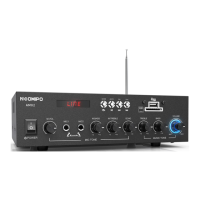
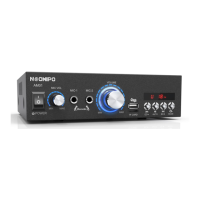
The NEOHIPO AM01 is a Hi-Fi Bluetooth stereo 2-channel amplifier designed for home audio systems. It boasts a 300W output and a Bluetooth signal range of up to 10 meters, making it a powerful and practical integrated amplifier. The device is versatile in its power options, operating on AC110-240V and also supporting a DC12V power supply.
Front Panel Features:
The front panel of the AM01 amplifier provides intuitive controls for various functions:
- Power ON/OFF Switch: Located on the far left, this switch controls the main power to the unit.
- Volume Control for Mic: A dedicated knob for adjusting the microphone volume.
- Microphone Inputs (MIC-1, MIC-2): Two 6.35mm jack inputs for connecting microphones, enabling karaoke functionality.
- Master Volume Control: A large central knob for adjusting the overall output volume.
- USB/TF Card Socket: A slot for inserting USB drives or TF cards to play audio files directly.
- Player Control: A set of buttons for media playback, including:
EC- and EC+: These buttons are used to adjust the reverberation effect of the microphone in Karaoke Echo mode.AUTO: This button is used for automatic channel search in FM mode.MODE: This button cycles through different input modes (AUX, Bluetooth, FM, USB/TF).K and I: These buttons are for track selection in USB/TF mode and station selection in FM mode.SD and USB indicators: Display the current input source.- Digital display: Shows the current time (e.g.,
00:25) or FM frequency.
Back Panel Features:
The back panel offers connectivity for speakers and power:
- Line Input (RCA): Stereo RCA inputs for connecting external audio sources like CD/DVD players.
- L+R 2X 4-8Ω Horn-Speaker: Speaker terminals for connecting two passive speakers with an impedance of 4-8Ω.
- FM ANT: An antenna connection for FM radio reception.
- DC12V Power Input: A DC input jack for connecting a 12V power adapter.
- AC110-240V Power Socket: A standard AC power input for connecting the amplifier to a wall outlet.
Remote Control:
The included remote control provides comprehensive control over the amplifier's functions:
- Power On/Stand By: Turns the amplifier on or off.
- Repeat One or All Tracks: Toggles repeat modes for audio playback.
- Mode Selection: Cycles through input modes: USB/SD, Bluetooth (BT), FM, LINE (AUX).
- Back Channels / Advance Channels: Used for navigating through channels or tracks.
- Equalizer (EQ): Offers 6 sound effects in USB/SD mode.
- Reverse / Forward: Skips backward or forward through tracks.
- Dual Function (Play/Pause & Scan/Program Preset):
- In USB/SD Mode: Plays or pauses audio.
- In FM Mode: Scans and programs preset stations (1-30 stations).
- Decrease Volume / Increase Volume: Adjusts the overall volume.
- Track Selection Keys (0-9): Direct selection of tracks or stations.
Start-Up and Usage:
- Power Connection: Before connecting the power supply, ensure the volume/power switch on the front panel is in the OFF position.
- DC12V Power Adapter: If using a 12V power adapter, the AM01 amplifier will automatically turn on, and the front panel power switch will not function. To power off, the 12V power adapter must be unplugged.
- AUX Mode (Default): Upon starting the amplifier, the default input setting is AUX mode. The priority order of input modes is AUX > Bluetooth > FM > USB/TF.
- Bluetooth Mode:
- Press the
MODE button to select Bluetooth mode.
- When the voice prompts "dingdang," use your Bluetooth device to search for "neohipo AM01" and connect.
- To remove a Bluetooth connection, press and hold the
MODE button for 3 seconds.
- FM Mode:
- Press the
MODE button to select FM mode (a radio-like sound will indicate this).
- Press the
AUTO button to automatically search for channels. Press AUTO again to interrupt the search.
- Once the search is complete, the AM01 will automatically save the found channels. Use the
K or I buttons to select saved radio stations.
- The antenna on the back panel can be stretched to enhance the FM signal.
- USB/TF Mode:
- Insert a U-disk or TF-card into the USB or TF port on the front panel after starting the amplifier.
- The AM01 will automatically recognize music formats and loop the music.
- Use the
K or I buttons to select your music.
- Karaoke Echo Mode:
- When a microphone is plugged in, the reverberation effect can be adjusted using the
EC- or EC+ buttons on the front panel.
Technical Specifications:
- Device Name: Bluetooth 2.0 CH Amplifier
- Input Mode: RCA, BT (Bluetooth), FM, USB, TF CARD, MIC
- Max Output Power: 300W
- Power Adapter: AC 110V-240V
- DC Input: DC 12V
- Frequency Range: 20Hz-20KHz (+/-3dB)
- THD (Total Harmonic Distortion): ≤ 0.1%
- SNR (Signal-to-Noise Ratio): ≥ 85dB
- RMS (Root Mean Square) Power: 15W*2
- Bluetooth Range: Up to 10m
- Recommended Speaker Power: 30-50 W
- Recommended Speaker Impedance: 4-8 Ω
- Dimensions: 20019355mm
Included In The Packaging:
- AM01 Amplifier *1
- Remote Control *1
- User Manual *1
- Power Cable *1
Troubleshooting:
- NO POWER:
- Issue: The fuse might be blown.
- Solution: Check the amplifier's fuse and replace it if necessary.
- Issue: Sound source or speakers may not be connected properly.
- Solution: Check all connections.
- NO SOUND:
- Issue: Volume control may be set to minimum.
- Solution: Adjust the volume knob to the proper position.
- Issue: Too high or too low resistance of the speakers.
- Solution: Make sure that the impedance of the speakers you connect to the amplifier is between 4 and 8 Ω.
- Issue: The amplifier is being switched off or disconnected (due to overheating).
- Solution: Turn the amplifier off and allow it to cool down, ensuring that the amplifier is properly ventilated, then turn it back on.
For any problems or suggestions, users can contact support at support@neohipo.com.


 To Next Page
 General