EN
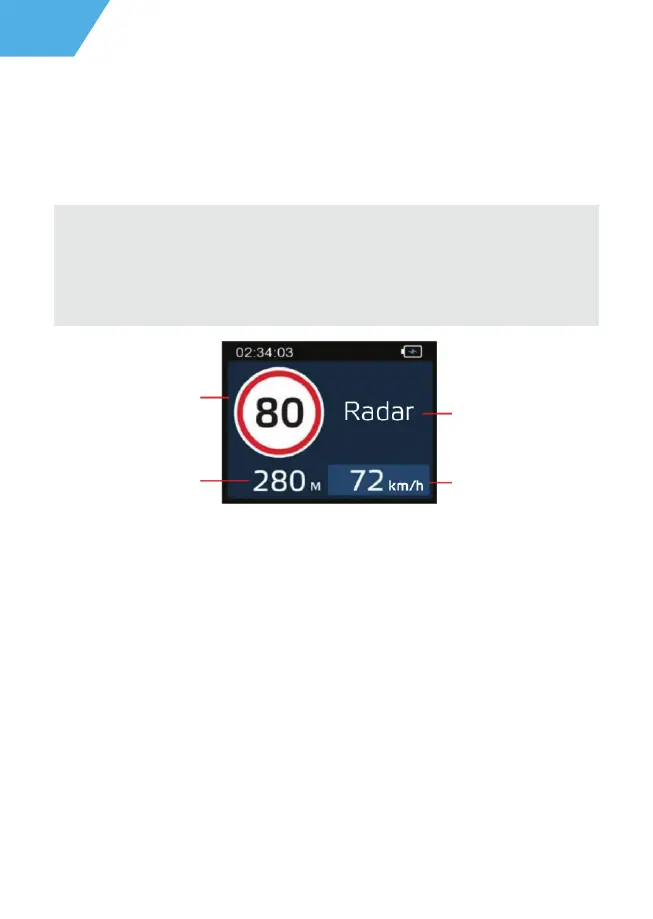
The device is equipped with a notification function about speed cameras and other traffic
rules. Depending on individual user settings the following information is displayed on the
screen:
- type of radar or camera,
- distance to radar,
- allowed speed on the site,
- the average speed of the car and the distance to the exit from the site when detecting
the average speed cameras.
When approaching a camera or radar, the device will notify you about the type
and allowed speed. For example, “Average speed control fifty”, which means approach-
ing the camera, which captures the travel time for further calculation of the average
speed at the speed limit in a section equal to 50 km / h.
Notification about traffic control cameras
- Exposure: -3 to +3 (stop = 1)
- Stabilization: ON/OFF
- Date Stamp: ON/OFF
16
ATTENTION! NEOLINE is not responsible for administrative penalties related to
traffic violations by the owner of the device. The function of alerting about speed
cameras and other traffic rules is for informational purposes only to provide
additional safety on the road.
Allowed speed
Type radar or camera
Current speed
Distance to police
radar point


 To Next Page
 Loading...