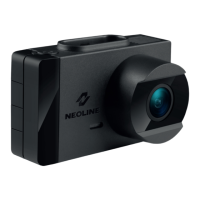
Need help?
Do you have a question about the Neoline G-TECH X36 and is the answer not in the manual?
Procedure for determining the optimal location and attaching the mount to the windshield for the DVR.
Instructions on how to adjust the DVR's vertical and lens orientation for the best field of view.
Detailed instructions for correctly inserting and removing the microSD card, including cautions.
Explains automatic power-on with car ignition and manual ON/OFF procedures for the device.
Instructions on how to access and play recorded video files using the Menu, Up/Down, and Confirm buttons.
Procedure for deleting files, protecting them from deletion, and using slide show. Notes on file recovery and formatting.
Details on configuring video settings like resolution, loop recording duration, and exposure levels.
Explanation of how average speed control systems work and warnings about exceeding permitted speeds.
List and description of various police radars and traffic control camera types, including their associated sounds and text alerts.
Detailed settings for traffic camera alerts, including radar alert, volume, alert type, range, permissible excess, and speed limit.
 General
| Frame Rate | 30 fps |
|---|---|
| Lens Angle | 140 degrees |
| Storage | microSD up to 128GB |
| G-sensor | Yes |
| Parking Mode | Yes |
| Screen Type | LCD |
| Video Resolution | 1920x1080 (Full HD) |
| Battery | 180 mAh |
| GPS | No |
| Wi-Fi | Yes |
| Power Supply | 12V car adapter |
| Connectivity | Wi-Fi |

 To Next Page