A
P
C
K
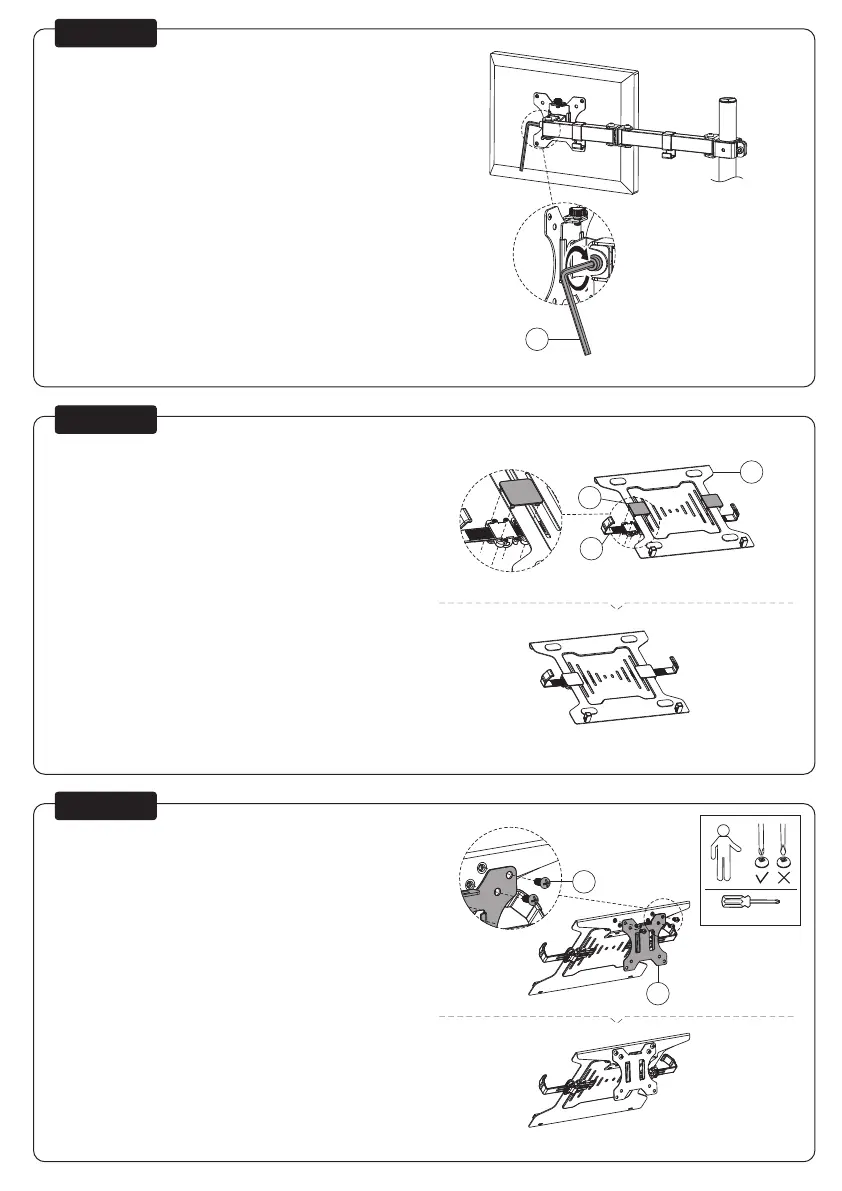
Adjust the torque
Stel het koppel in
Das Drehmoment einstellen
Ajustez les couples de serrage
Regolare la coppia
Ajustar el par
Ajustar o torque
Ustawić momenty obrotowe
EN
NL
DE
FR
IT
ES
PT
PL
STEP 5
Attach the clamps to the laptop holder
Bevestig de klemmen aan de laptophouder
Befestigen Sie die Klemmen an der Laptophalterung
Fixer les pinces au support de l'ordinateur portable
Fissare i morsetti al supporto per laptop
Fije las abrazaderas al soporte del portátil
Fixar os grampos no suporte para computador portátil
Przymocuj zaciski do uchwytu na laptopa
EN
NL
DE
FR
IT
ES
PT
PL
STEP 6
Attach the VESA plate to the laptop holder
Bevestig de VESA-plaat aan de laptophouder
Befestigen Sie die VESA-Platte an der Laptophalterung
Fixer la plaque VESA au support de l'ordinateur portable
Fissare la piastra VESA al supporto per laptop
Fije la placa VESA al soporte del portátil
Fixar a placa VESA no suporte para computador portátil
Zamocuj płytę VESA do uchwytu na laptopa
EN
NL
DE
FR
IT
ES
PT
PL
STEP 7
* Not Included
P
C
E
D
K
A



 To Next Page