45
ENGLISH
9.2 Clearing stoppages
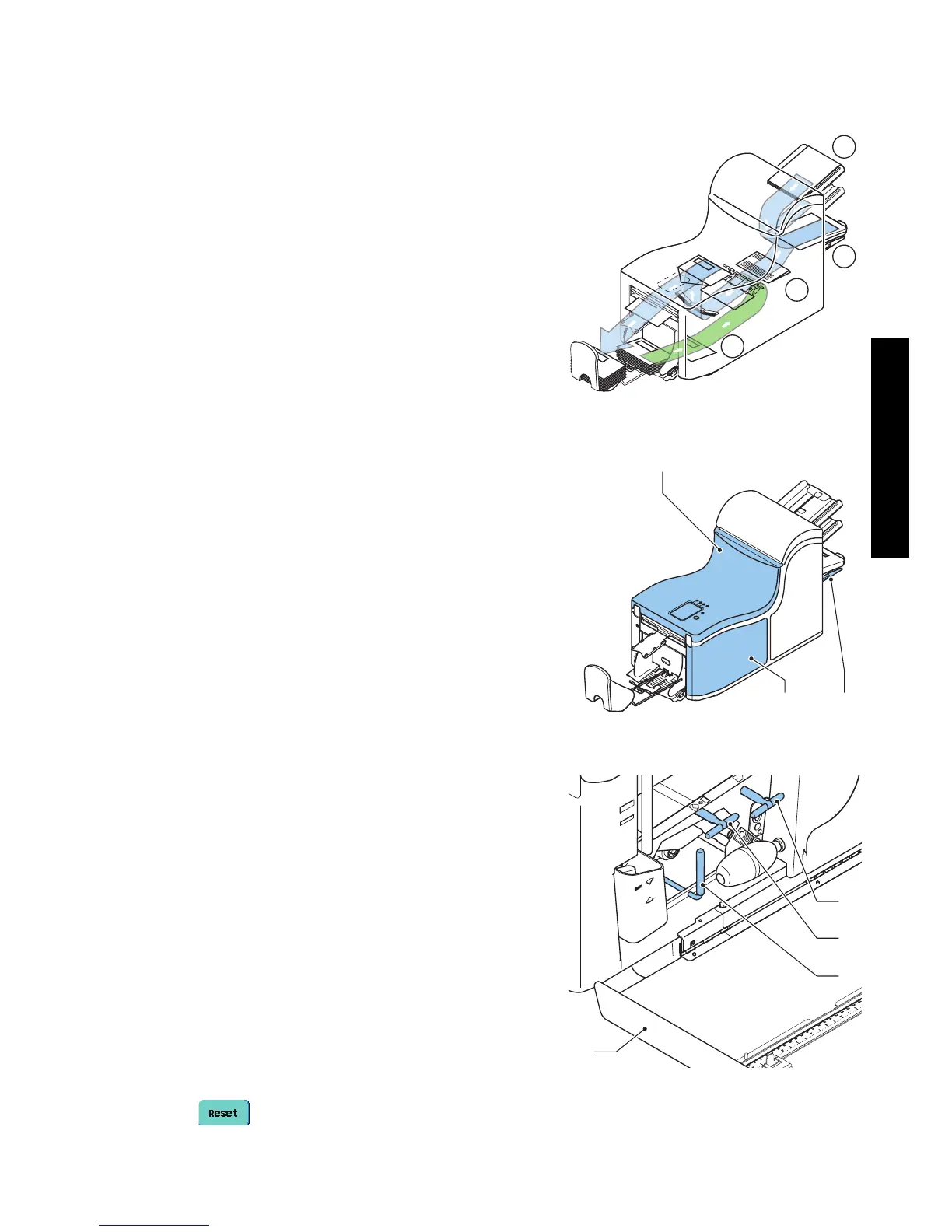
Stoppages can occur in the following area’s:
1 - flexFeed
®
2 -Collating area
3 -powerFold
®
4 -Lower envelope track
For clearing stoppages, three sections of the system
can be opened (A, B and C).
A - Top cover to reach the powerFold
®
and
flexFeed
®
area.
B - Collator plate to reach the collator area.
C - Front cover to reach the envelope track and
inserter area.
Lower envelope track
Remove the envelopes as follows:
1. Open the side cover C.
2. Lower and hold the handle D to the left and
remove the envelope(s) from the lower
envelope track.
3. Release the handle D.
4. If necessary, the envelopes and documents can
be transported manually by turning the blue
knob E clockwise.
5. Turn the blue knob F clockwise to manually
transport envelopes through the lower envelope
track.
6. Close the side cover.
7. Press to reset the error and restart the job.
1
2
3
4
BC
A
C
D
F
E



 To Next Page