B) Erase one track
4. Set at CD function mode and place the un-finalized CD-RW disc you would like to delete the track.
5. Press the “ Erase “ button(12) at CD stop mode & “Er“ and the last track number will appear on the LCD (2)
6. Press the “ Play/Pause
” button to start erasing the last track and “ busy “ will disappear on the LCD (2) .
7. After finishing, the track erasing display will show total track nr. and total playing time of the disc and the“ NO TOC ”
indicator will appear.
8. Repeat step 5 and 7 to continue erasing if you wish.
C) Erasing all tracks
1. Set at CD function mode and place the CD-RW disc you would like to delete the tracks.
2. Press the “ Erase “ button(12) at CD stop mode repeatedly until “ Er all “ appears on the LCD (2)
3. Press the “ Play/Pause
” button to start erasing. The LCD display will indicate “busy” during erasing
4. The LCD (2) will show “ 0000000 “ to confirm the complete erasing process has been completed.
Remark :
- Once tracks are erased they are erased forever and the process cannot be reversed.
- Already copied CD-RW discs from other systems cannot be erased track by track. Only Erase All is possible.
Listing to Cassette Tapes:
General operation
Select the function switch(26) to “ source ” position. The LCD display (2) will show “ pls select function “. Then press the Tape
button (22)
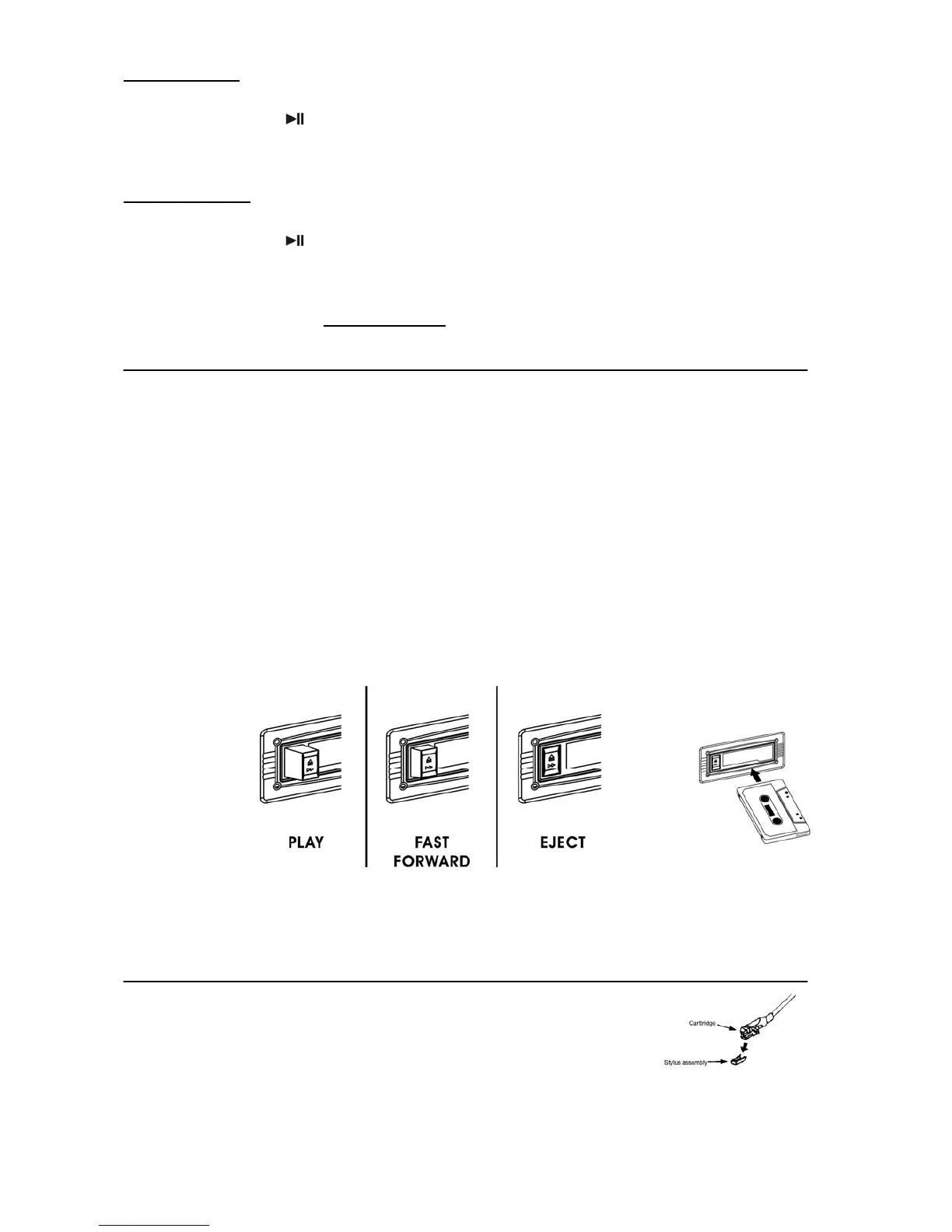
Cassette playback : The system will start the playback automatically after inserting
cassette tape
Stop and ejection : Press the “ Tape forward / Eject “ button completely inwards
and the cassette tape will be ejected though the cassette door cover. The “ Tape forward /
eject “ button will stay at its depressed height position.
Fast forward : Press the “ Tape forward / Eject “ button half inwards during
Playback mode, the tape winding forward direction. The “ Tape forward / Eject “ button will
keeping at its middle height position.
Slightly press the “ Tape forward / Eject “ button again to resume normal playback. The “ Tape
forward / Eject “ button will resume to its highest position.
Remark
- Make sure the direction is correct when inserting the tape into the system.
- You should remove the cassette tape from the system once you have finished listening to the tracks.every times after
listening and don’t leave the cassette tape inside the system when not under playback mode.
Phono
operation
- Remove the stylus protector.
- Be sure that the tone arm is detached from the tone arm rest before operating and
re-secured again afterwards.
1. Select the function switch(26) to “ Source ” position. The LCD display (2) will show “ pls select function “. Then press the
phono button (25)
2. Set the speed selector (38) to the proper position depending on the record to be played.
3. Place the record on the platter (use the spindle adaptor if required).
4. Set the cueing lever (36) to the up position.
E-5



 To Next Page
 Loading...