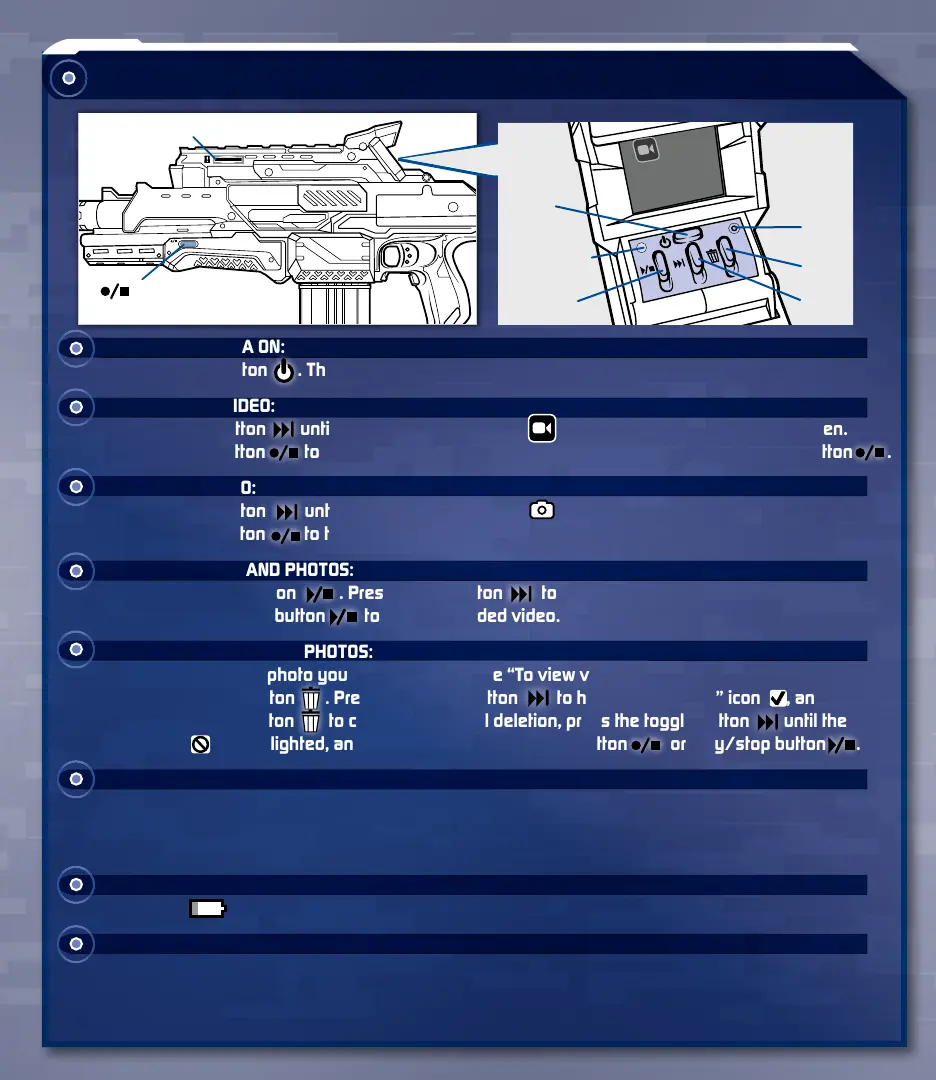
Camera
TO TURN CAMERA ON:
Press on/off button . There will be a slight delay as the camera powers up.
TO RECORD A VIDEO:
Press toggle button until you see the record icon in the upper left corner of the screen.
Press record button to start recording. To stop recording: Press record/photo mode button .
TO TAKE A PHOTO:
Press toggle button until you see the photo icon in the upper left corner of the screen.
Press record button to take a photo.
TO VIEW VIDEOS AND PHOTOS:
Press play/stop button . Press toggle button to scroll through your videos and photos.
Press the play/stop button to play a recorded video.
TO DELETE VIDEOS AND PHOTOS:
Locate the video or photo you wish to delete (see “To view videos and photos” section).
Press the delete button . Press the toggle button to highlight the “yes” icon , and
press the delete button to confirm. To cancel deletion, press the toggle button until the
“no” icon is highlighted, and press record/photo mode button or play/stop button .
RESET BUTTON:
Press the reset button if the camera functions are not working properly or the screen is frozen
because the device was subjected to an electrostatic discharge (static shock). Use the tip of a
pen to press the button.
LOW BATTERY INDICATOR:
This icon will appear on the screen if the batteries are low.
AUTO SHUT-OFF:
The camera automatically shuts off if left inactive for approximately two minutes. There will be a 10-
second countdown on-screen to warn you. Press any key to wake the camera. After 10 seconds,
the camera powers down, and you will need to press the on/off button to power up the camera.
memory card slot
microphone
on/off
toggle
reset
screen
delete
play/stop
record/photo
mode button



 To Next Page