7
OPERATING THE RADIO
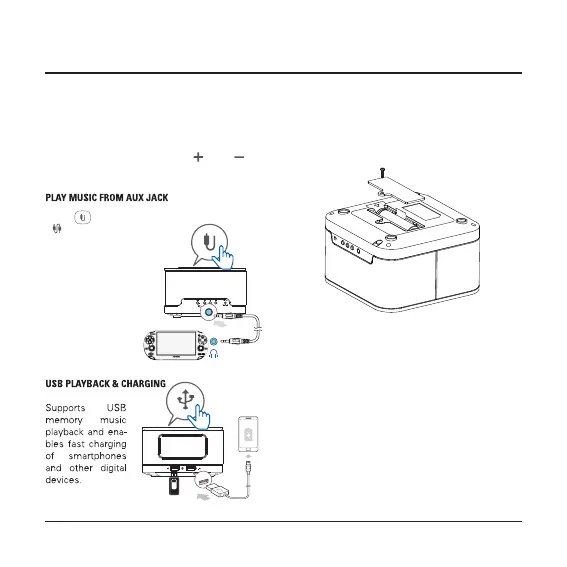
The 3.7V lithium baery is to retain the clock/alarm
in case of a power failure. It cannot display the
alarm/clock me when the baery is low, it will
need recharging.
Replace or recharge the lithium battery
Press“ ” to put AUX IN on,
“ ” appears on the LCD dis-
play. Plug in the 3.5mm audio
cable into the AUX IN jack.
Play music now.
accordingly. The frequency starts from 87.5MHz to
108MHz and skips at every 0 .1 MHz in scanning
process. Once catching a staon, it stops a second
and store it, then connues the auto-scanning.
When it scans from 87.5MHz to 108MHz, it will
stop scan automacally. Press “ ” or “ ” to
select the staon.


 To Next Page