1.1. Purpose
Remote Control is designed to control remotely the executive devices of the Radio series, as well as
executive devices of the Radio series using transcoder Nero 8361 UPM.
Two-channel Remote Control
Radio 8101-4M
Passport
1.2. Specifications
Operating frequency range, MHz...........................................................................................433,05 - 434,79
Maximum power of emitted signal, not more than, MW...............................................................................10
Number of control channels..............................................................................................................................4
Battery type............................................................................................................................................CR2032
Battery voltage, V...............................................................................................................................................3
Overall dimensions, mm.....................................................................................................................40×67×10
Operation temperature range, °С.................................................................................................from 0 to +40
Degree of frame protection.........................................................................................................................IP40
1. Device description
1.3. Peculiarities
Remote Control has one operation mode:
- step-by-step control («UP-STOP-DOWN-STOP» commands are executed circle-wise for every channel);
- transmission of control commands with static or dynamic code. Factory setting – dynamic code.
When controlling the executive device in static mode, it is possible to copy the remote control signal by an attacker, which will allow him to
control your object (roller shutter, barrier, gate). The possibility of copying and hacking is excluded in dynamic mode. Dynamic transmission
of the radio remote control is supported only by devices released after 2015. More information you can find in manual for device,
and applying to manager or the technical support service, the telephone number of which you can find on the manufacturer's website.
1
1
Channel 4
Channel 3
2. Programming
Recording the remote control channel into the memory of the executive device
1. Input the executive device in the programming mode (see manual
for the corresponding device).
2. Record the control channel of remote control:
a) with dynamic transmission code: press and hold the
recordable channel button, and press short any other;
b) with static transmission code: press short the recordable
channel button.
Confirmation of record on the executive device depends on the
programming type and mode: short-long-short green flash on the
indicator or long-term movement «DOWN», short-term «UP-DOWN»
movement and long-term «UP» movement of the roller shutter.
The executive device supports only the static transmission code if the remote control is not recorded.
Changing the remote control code: selection of dynamic or static code
2. Change the transmission type: press short any other remote
control button. The control transmission type is switched circle-wise
each time you press the second button.
1. Press and hold any remote control button, and press short the
second button. Do not release the first button until the end of
programming.
- double flash – dynamic code (factory operation mode);
- triple flash – dynamic code with high range.
- single flash – static code;
1. The indicator blinks off for 2 sec. Then the indicator of the remote
control blinks red:
Delete the remote control channel from the memory of the executive device
1. Input the executive device in the programming mode (see manual
for the corresponding device).
2. Delete the control channel:
b) with static code: press and hold the erasable channel
button for more than 1 sec.
a) with dynamic code: press and hold the erasable channel
button, and then press any other for more than 1 sec.
Confirmation of deletion on the executive device depends on the
programming type and mode: one long-term red flash or long-term
«DOWN-UP» movement of the roller shutter.
Channel 1
Channel 2

 Need help?
 General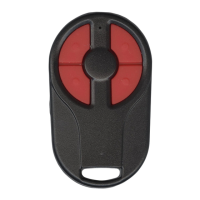

 To Next Page

