This document is a user manual for the NESCAFÉ Dolce Gusto Neo coffee machine, manufactured by DeLonghi. It provides comprehensive information on the machine's overview, connection, status, operation, and maintenance.
Function Description
The NESCAFÉ Dolce Gusto Neo is a coffee machine designed to prepare a variety of beverages from Roast & Ground coffee, soluble coffee, milk, cacao, and plant-based beverages (such as oat milk, coco milk, and almond milk). It supports both coffee pods and sachets, or a combination of the two, allowing for a wide range of drink customisation. The machine features smart connectivity via Bluetooth® and WiFi, enabling cup customisation, smart re-ordering, reward programs, and access to help and support through the NESCAFÉ Dolce Gusto® app. It also includes an automatic shut-off feature after 1 minute of inactivity to save energy.
Important Technical Specifications
- Dimensions:
- A = 14.9 cm
- B = 33.9 cm
- C = 40.1 cm
- Weight: 4.3 kg
- Water Tank Capacity: 1.3 L
- Power Supply: 220-240 V, 50/60 Hz, 1340-1600 W
- Pressure: Max. 15 bar
- Operating Temperature: 5-45 °C (41-113 °F)
- Connectivity:
- BLE (Bluetooth Low Energy): Frequency 2402-2480 MHz, Max power 0 dBm or 1 mW
- WiFi: Frequency 2412-2484 MHz, Max power +20 dBm or 100 mW
- Standby Consumption: < 50 mW
Usage Features
The machine offers a user-friendly experience with several key features:
- Multi-Coloured Start Button: Provides visual feedback on the machine's status.
- Bluetooth® and WiFi LED: Indicates connectivity status.
- Pod Inlet / Shutter and Sachet Door / Holder: Designed for easy insertion of coffee pods and sachets.
- Drip Grid and Drip Tray: Adjustable to accommodate various cup sizes.
- Beverage Preparation:
- Black Coffee (Pod Only): Includes options like Espresso (45 ml, 20 s), Americano (205 ml, 1 min 15 s), Drip-style coffee (400 ml, 3 min 30 s), and Grande (200 ml, 1 min 30 s). Preheating is recommended for espresso.
- Coffee Specialties (Pod and Sachet): Examples include Cappuccino (270 ml, 1 min 15 s) and Latte Macchiato (300 ml, 1 min 15 s). The machine automatically recognises the recipe and prepares the beverage.
- Other Drinks (Sachet Only): Such as Café au Lait (195 ml, 1 min 15 s) and Hot Chocolate (125 ml, 40 s).
- Automatic Recognition: The machine automatically recognises beverage parameters (sequence, volume, temperature) for optimal preparation.
- Manual Stop: Users can manually stop extraction for a shorter cup by pressing the start button.
- Longer Cup: For a longer cup, press the start button again while it is flashing.
- Automatic Rinsing: For some beverages, the machine performs an automatic rinsing at the end of preparation.
- Connectivity: The NESCAFÉ Dolce Gusto® app allows for cup customisation, smart re-ordering, reward programs, and access to help and support. Pairing involves enabling Bluetooth® and WiFi on the phone, opening the app, and following pairing instructions. A steady white WiFi LED indicates a successful connection.
Maintenance Features
Regular cleaning and descaling are crucial for maintaining machine performance and beverage quality.
- Rinsing (Before First Use and After 2 Days of Inactivity):
- Remove and fill the water tank with fresh drinking water.
- Place an empty container under the coffee outlet.
- Switch on the machine (start button flashes green).
- Close the slider (without a pod) and press the start button for 5 seconds until it flashes green twice, then starts softly dimming green.
- Empty the container and water tank once rinsing stops (start button turns steady green).
- Regular Cleaning:
- Water Tank: Empty and clean weekly with a long soft brush and mild detergent. Rinse with water. Not dishwasher-proof.
- Sachet Holder: Open the sachet door, remove the holder, and clean with fresh water and a sponge. Dry with a soft dry cloth.
- Pod Bin: Empty daily. Remove water first, then pods. Clean with fresh water and a sponge. Dry with a soft dry cloth. The pod bin may contain hot water and rinsing water.
- Drip Grid / Drip Tray: Empty and rinse with fresh water and a sponge. The drip tray is dishwasher-proof.
- Descaling (Every 6 Months or at Descaling Alert):
- Mix 0.5 liter of fresh water with NESCAFÉ® Dolce Gusto® liquid descaler and pour into the empty water tank.
- Insert the water tank, remove the drip tray, and place a container (min 0.7 L) under the coffee outlet.
- Remove any pod/sachet and close the sachet door.
- Close the slider and press the start button for 15 seconds to enter descaling mode (start button turns from steady green to softly dimming orange).
- Once the water tank is empty, the start button turns steady blue. Wait at least 2 minutes.
- Empty and rinse the water tank, refill with fresh water, and insert into the machine.
- Remove the drip tray (if needed) and place an empty container under the coffee outlet.
- Close the slider and press the start button once to start rinsing (start button dims orange softly).
- Empty the container and water tank once rinsing is finished. Refill and reinsert the water tank and drip tray.
- Important: Do not use vinegar. Do not unplug the machine during descaling. Connecting the machine to the app provides automatic descaling notifications.
- Jet Nozzle Cleaning / Descaling:
- Clean regularly, especially if foam quality decreases, water sprays during extraction, or the descaling alarm is on.
- Remove any pod/sachet, close the sachet door and slider, and ensure the pod bin is inserted.
- Press the start button for 10 seconds until it blinks purple. Wait for the jet nozzle to move to the removal position (start button turns steady purple).
- Open and remove the sachet holder, then the pod bin.
- Open the cleaning door, turn the pink part, and remove the jet nozzle downwards. Clean it in the dishwasher or with a brush/sponge. Ensure it remains in an open position.
- After cleaning, check for residues. Use the cleaning pin (under the drip tray) to clear any blockages in the small channel.
- Reinsert the opened jet nozzle, follow the steps in reverse order. Press the start button for at least 3 seconds to exit removal mode. The machine performs an automatic rinsing and turns steady green.
- If water flow issues persist, soak the jet nozzle in descaling solution overnight, then rinse, dry, reinsert, and perform a machine descaling.
Alerts / Troubleshooting
The manual provides a detailed overview of different start button indications and corresponding actions:
- Flashing Green: Heating up (wait for steady green) or top-up time for beverage preparation (press start button again for longer cup).
- Steady Green: Ready for beverage preparation or beverage preparation completed (insert pod/sachet).
- Dimming Green: Preparing beverage/dispensing hot water (wait until finished) or rinsing mode (wait until stops).
- Steady Blue: Water tank empty (refill) or machine needs water priming (press start button again 2+ times) or jet nozzle needs descaling (clean and descale).
- Flashing White: Pod bin full/not well inserted/pod blocked (empty pod bin or remove blocked pod).
- Steady Yellow: Sachet left in machine (remove sachet).
- Flashing Yellow: Pod/sachet cannot be detected (reinsert pod/sachet).
- Orange: Machine needs descaling and jet nozzle cleaned (follow descaling/cleaning procedure).
- Purple: Machine ready for jet nozzle removal and cleaning (remove and clean jet nozzle).
- Steady Red: Technical error (unplug/replug, call hotline).
- No Power: Machine cannot be switched on (check power plug, call hotline).
Specific troubleshooting steps are provided for:
- Start button turns steady blue (no beverage/stops mid-extraction): Water tank empty (refill) or water priming issue (press start button 2+ times) or jet nozzle needs descaling (descale).
- Start button flashes white rapidly (pod blocked/pod bin full): Ensure machine is on, empty pod bin. If still flashing, check pod inlet for blocked pod (use a spoon, do not use fingers).
- Start button turns steady yellow (sachet left in machine): Remove sachet. If button remains yellow and holder is empty, it's due to sachet removal while machine was off.
- Start button flashes yellow (pod/sachet not detected): Reinsert pod/sachet in different orientation, or use a new one. Clean camera near sachet holder.
- Start button is steady orange (machine needs descaling): See descaling section (pages 18-21). Descale every 6 months.
- Descaling mode activated by mistake: Press start button once to stop (turns steady orange). To exit descaling mode, press start button for 15 seconds until it flashes orange, then turns steady green.
- Start button turns steady red (technical error): Switch off, unplug for 10 seconds, plug in again. If error persists, call hotline.
- Sachet holder maintenance: Scan QR code for additional instructions.
- Machine cannot be switched on: Check power plug. If problem persists, call hotline.
- Resetting to factory settings: Press ON/OFF button and start button simultaneously for 15 seconds while machine is on (start button flashes 5 times).

 Need help?
 General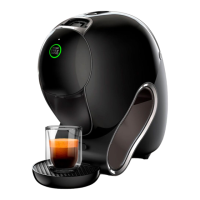



 To Next Page