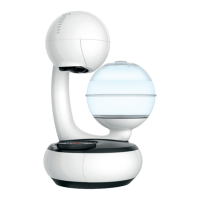
This document is the user manual for the NESCAFÉ® Dolce Gusto® Neo coffee machine, an eco-conscious system designed to deliver a high-quality coffee shop experience at home. The system utilizes technologically advanced machines and biodegradable paper-based pods.
Function Description:
The Dolce Gusto Neo is a coffee machine that prepares beverages from specialized pods. It features an automatic ON/OFF function to save energy, switching off after 1 minute of inactivity. The machine automatically recognizes the inserted pod and sets the correct volume and extraction parameters. It also includes a hot water function, accessible by closing the slider without a pod and pressing the start button. The machine can be connected to a smartphone via Bluetooth® and WiFi through the NESCAFÉ® Dolce Gusto® app, offering exclusive services and rewards such as cup customization, one-click re-ordering, and help/support. Users can earn points for each extracted cup when connected to the app.
Important Technical Specifications:
- Power Supply: 220–240 V, 50/60 Hz
- Power Consumption: 1340-1600 W
- Weight: 3.4 kg
- Pump Pressure: Max. 15 bar
- Operating Temperature: 5-45 °C (41-113 °F)
- Water Tank Capacity: 1 L
- Dimensions (approximate):
- A (Height): 15.37 cm
- B (Width): 30.10 cm
- C (Depth): 31.93 cm
- Energy Efficiency: A++ (New ON/OFF feature with <0.015 W consumption when off)
- Connectivity: Bluetooth® and WiFi
Usage Features:
- First Use / Rinse: Before first use, the machine requires a rinsing cycle. This involves filling the water tank, placing a container under the coffee outlet, plugging in the machine, switching it ON, closing the slider (without a pod), and pressing the start button for 5 seconds.
- Making Coffee:
- Adjust the drip tray position and place a cup.
- Ensure sufficient water in the tank and the machine is plugged in.
- Switch ON the machine using the ON/OFF button.
- Open the slider, insert a pod in the correct direction, and close the slider.
- Press the start button; the machine will automatically recognize the pod and begin extraction.
- For a longer cup, press the start button again while it is flashing after extraction.
- For a shorter cup, press the start button at any time to manually stop extraction.
- Pods are automatically ejected into the pod bin 10 seconds after extraction.
- Americano Experience: For authentic Americano, insert an Americano pod. Coffee will be extracted first, followed by hot water.
- Hot Water Function: Close the slider (without a pod) and press the start button to dispense clear hot water.
- Connectivity Features (via app):
- Pairing: Enable Bluetooth® and WiFi on your phone, open the NESCAFÉ® Dolce Gusto® app, and follow pairing instructions. The connection is confirmed when the icon is steady white.
- Rewards: Earn points for each extracted cup.
- Customization: Customize your cup settings.
- Re-order: One-click re-ordering of pods.
- Support: Access help and support resources.
Maintenance Features:
- Cleaning:
- Water Tank: Remove, rinse, and clean the water tank (a brush may be used). Fill with fresh water and re-insert. Note: The water tank is not dishwasher-proof.
- Drip Tray and Drip Grid: Empty, rinse with tap water.
- Pod Bin: Empty and rinse regularly. Note: Paper-based and biodegradable pods.
- Rinsing Cycle: Place a 0.5 L container under the coffee outlet, plug in, switch ON. Close the slider (without a pod) and press the start button for 5 seconds. The button will flash green twice, then softly dim green, indicating rinsing has started.
- After rinsing, empty the container and water tank. Clean the machine with a soft damp cloth and dry with a soft dry cloth.
- Descaling:
- Frequency: Descale at least once a year, or every 3-4 months if the beverage comes out slower or cooler. The machine will indicate descaling is needed by an orange start button.
- Preparation: Do not use vinegar. Mix 0.5 liter of tap water with NESCAFÉ® Dolce Gusto® liquid descaler (sold on website) and pour into the empty water tank.
- Initiating Descaling: Insert the water tank, remove the drip tray, and place a 0.7 L min container under the coffee outlet. Switch ON the machine, close the slider, and press the start button for 15 seconds until it rapidly flashes orange twice. The button will then softly dim orange, and descaling begins.
- Waiting Period: Once the button turns blue, wait at least 2 minutes.
- Rinsing Process: After 2 minutes, refill the water tank with tap water and re-insert. Remove the drip tray and place an empty 0.5 L container under the coffee outlet. Close the slider and press the start button once. It will dim orange softly, and rinsing will start.
- Completion: Empty the container and water tank once rinsing is finished. Refill and re-insert the water tank and drip tray.
- App Notification: Connect your machine to the app to receive automatic notifications when it's time to descale.
- Troubleshooting (Help and Support):
- Start button steady green: Machine ready or brewing completed.
- Start button dimming green: Machine brewing coffee, dispensing hot water, or in rinsing mode.
- Start button rapidly flashing green: Machine heating up, or pod will be ejected after 10 seconds.
- Start button rapidly flashing white: Pod bin is full. Wait for automatic pod ejection, then empty the bin. Do not unplug.
- Start button steady blue: Beverage preparation stopped or did not start due to empty water tank. Refill water tank, ensure it's in place, and press start button to continue.
- Start button orange: Machine needs descaling.
- Start button steady red: Technical error. Call hotline.
- Start button flashes yellow: Machine unable to detect pod. Re-insert pod in a different orientation or use a new pod.
- Pod blocked/trapped: Open slider, use a spoon to pull up or push pod into bin. Never put fingers inside the pod inlet.
- Machine cannot be switched on: Check power plug. If issue persists, call hotline.
- Beverage comes out slower/cooler: Descale the machine.
- Machine unused for >2 days: Empty water tank and pod bin. Ensure no pod remains in the brewing unit. Rinse before reuse.
- Reset to factory settings: Press ON/OFF and start button simultaneously for 15 seconds while machine is on. Start button flashes green 5 times.
- Connectivity icon not lit: Machine not connected. Redo Bluetooth® pairing and WiFi connection.
- Connectivity icon blinking slowly: Machine trying to re-connect. Check online FAQ if problem persists.
- Connectivity icon blinking fast: Machine's firmware is being updated.

 Need help?
 General



 To Next Page