Need help?
Do you have a question about the nest H13000ES and is the answer not in the manual?
Get the Nest app for Android or iOS to begin setup.
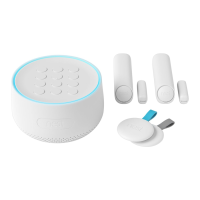
Steps to add Nest Guard first, then Tags and Detects.
Requirements for setting up and using Nest Secure, including hardware and network.
Instantly sounds the alarm and sends an emergency alert.
Buttons to switch between security levels (Away, Home, Off).
Enter passcode or tap Nest Tag to arm/disarm the system.
Tap and hold Nest Tag on Guard to arm or disarm the system.
Senses motion; button opens doors without alarm.
Senses door/window open/close with Nest Detect.
Tips for placing Nest Guard near entryways and at the correct height.
Must be between 28 and 42 inches above the floor for optimal performance.
Guard placement on surfaces and near edges for optimal range.
Motion detection range up to 10 feet and 90° in front.
Detects open/close or motion when placed on a door.
Detects window open/close when placed on a window.
Detects motion when placed on a wall.
Must be mounted 5 to 6 feet 4 inches above the floor.
Motion detection range up to 15 feet away.
Turn on for dogs under 40 lbs to avoid false alarms.
Specific mounting heights for Nest Guard/Detect with dogs.
Reduced motion detection range when using the feature.
Three levels: Away and Guarding, Home and Guarding, Off.
Use when no one is home; detects motion and open/close.
Use when home; detects open/close.
Use passcode, Nest Tag, or the Nest app to control the system.
Hold Tag on Guard to disarm or arm the system quickly.
Use security level buttons and passcode on the keypad.
Provides time to leave or disarm before alarm sounds.
Nest Secure does not auto-arm/disarm based on location.
Provides up to 12 hours of backup power during outages.
Subscription service for internet outage backup connectivity.
Explains Heads-Up alert and alarm sounds/lights.
How to use the panic button for alarms and notifications.
Meaning of pulsing red light ring and alarm sounds.
Open doors/windows without alarm in Home mode.
 General
| Two-Way Audio | Yes |
|---|---|
| Battery Backup | No |
| Video Resolution | 1080p HD |
| Field of View | 130 degrees |
| Night Vision | Yes |
| Wireless Connectivity | Wi-Fi |
| Storage Options | Cloud Storage |
| Power Source | Wired |
| Voice Alerts | Yes |


 To Next Page