Need help?
Do you have a question about the nest Secure and is the answer not in the manual?
Lists the necessary hardware and software for setting up and using Nest Secure.
Explains how to arm or disarm the system using the Nest Tag.
Provides advice on where to position Nest Guard for best performance.
Details the required height and edge proximity for Nest Guard placement.
Describes the three security levels: Away, Home, and Off.
Explains methods for arming and disarming the Nest Secure system.
Details features like No Rush and Remind Me notifications.
Covers features of Nest Guard, including backup and cellular options.
Details features like Quiet Open, Pathlight, and adding more Detects.
Explains home entry schedules and disabling Nest Tags.
Outlines steps for testing Nest Guard and Nest Detect functionality.
Solutions for Nest Detects that appear offline in the app.
Specifies power requirements for Nest Guard and Nest Detect.
Details the environmental conditions for safe indoor use.
Information regarding FCC compliance for the Nest Secure system.
Details RF exposure limits and safety guidelines.
Defines what the limited warranty covers and its duration.
Explains how to make a warranty claim and get service.
Lists what is not covered by the limited warranty.
 General
| Product Type | Home Security System |
|---|---|
| Alarm | Built-in siren |
| Mobile App Support | iOS, Android |
| Connectivity | Wi-Fi, Bluetooth |
| Compatibility | Works with Google Assistant |
| Sensors | Motion, Door/Window |
| Control Method | Voice, App, Keypad |
| Power Source | AC power, Battery backup |
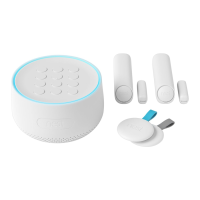
| Components | Nest Guard, Nest Detect |
| Nest Guard Features | Keypad, Siren, Motion Sensor |
| Nest Detect Features | Motion detection, Open/close detection |

 To Next Page