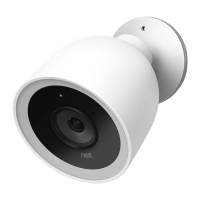
The Nest Cam IQ outdoor security camera is a sophisticated device designed to provide comprehensive surveillance for your property. This installation guide outlines the necessary steps and considerations for setting up and using your camera effectively.
Function Description:
The Nest Cam IQ is an outdoor security camera that streams live video to the Nest app, allowing you to monitor your property remotely. It features a wide 130-degree field of view and a fully articulating hinge, offering flexibility in camera placement and direction. The camera is equipped with a speaker and microphone, enabling two-way communication. Its primary function is to enhance home security by providing video surveillance, allowing users to see and speak to people on their property.
Important Technical Specifications:
- Field of View: 130 degrees
- Power Cable Length: 25 feet (7.5 meters) outdoor-rated power cable
- Operating Temperature: -40° to 113°F (-40° to 45°C)
- Connectivity: Wi-Fi and Bluetooth 4.0
- Power Adapter: Indoor power adapter (not weatherproof)
- Recommended Upload Speed: At least 2 Mbps (DSL connections may not have enough bandwidth)
- Mounting Height: Recommended 7 to 10 feet above the ground, tilted downward.
Usage Features:
- Remote Monitoring: Stream live video to the Nest app from anywhere.
- Flexible Placement: The fully articulating hinge allows for mounting almost anywhere and pointing in any direction. Ideal locations include overlooking garages, patios, or back, side, or front doors.
- Zoom and Enhance: Use the Nest app to zoom in and enhance the view for detailed observation.
- Two-Way Communication: The built-in speaker and microphone allow you to talk to people through the camera.
- Easy Setup: The initial setup involves connecting the camera indoors to the Nest app via QR code scanning and Wi-Fi network connection.
- Cable Management: The 25-foot outdoor-rated power cable can be routed through or along a wall to an indoor power outlet. Included cable clips help secure the cable for a clean installation.
- Wi-Fi Signal Testing: Before final installation, it is crucial to test the camera's video streaming outdoors to ensure adequate Wi-Fi signal strength. Thick or insulated walls can reduce signal strength, so choosing a location within range of your router is important.
- Wall Plate Installation: The camera mounts to a wall plate. Pilot holes are drilled for screws, and wall anchors are provided for hard materials like brick or stucco. Caulk can be used to seal the wall plate, with a small opening at the bottom for water drainage.
- Cable Routing Options: The cable can be routed directly through a hole behind the wall plate or through a notch in the wall plate if running along the wall.
- Secure Attachment: The power cable clicks into the camera base, which then pushes into the wall plate until it clicks into place.
- Disconnection: An included hex key is used to disconnect the camera from the wall plate if unmounting is necessary.
Maintenance Features:
- Cable Clips: Included cable clips help secure the power cable, contributing to a tidy and organized installation. The cable and clips can be painted to match your home's exterior.
- Caulking: Spreading caulk around the edge of the wall plate before installation helps seal it against the elements, with a small open space at the bottom for water drainage.
- Power Adapter: The indoor power adapter is not weatherproof and must be plugged into an indoor outlet, protecting it from outdoor conditions.
- Airflow: To prevent overheating and burns, it is important not to block airflow to the Nest Cam IQ.
- Safety Guidelines: The device should be used within specified temperature ranges and installed according to local building and installation codes. The power cable and adapter provided must be used to avoid fire and shock risks. All components should be kept out of reach of children and pets to prevent serious injury.
The Nest Cam IQ is designed for user-friendly installation and reliable outdoor surveillance, offering peace of mind through continuous monitoring and communication capabilities.

 Need help?
 General

 To Next Page