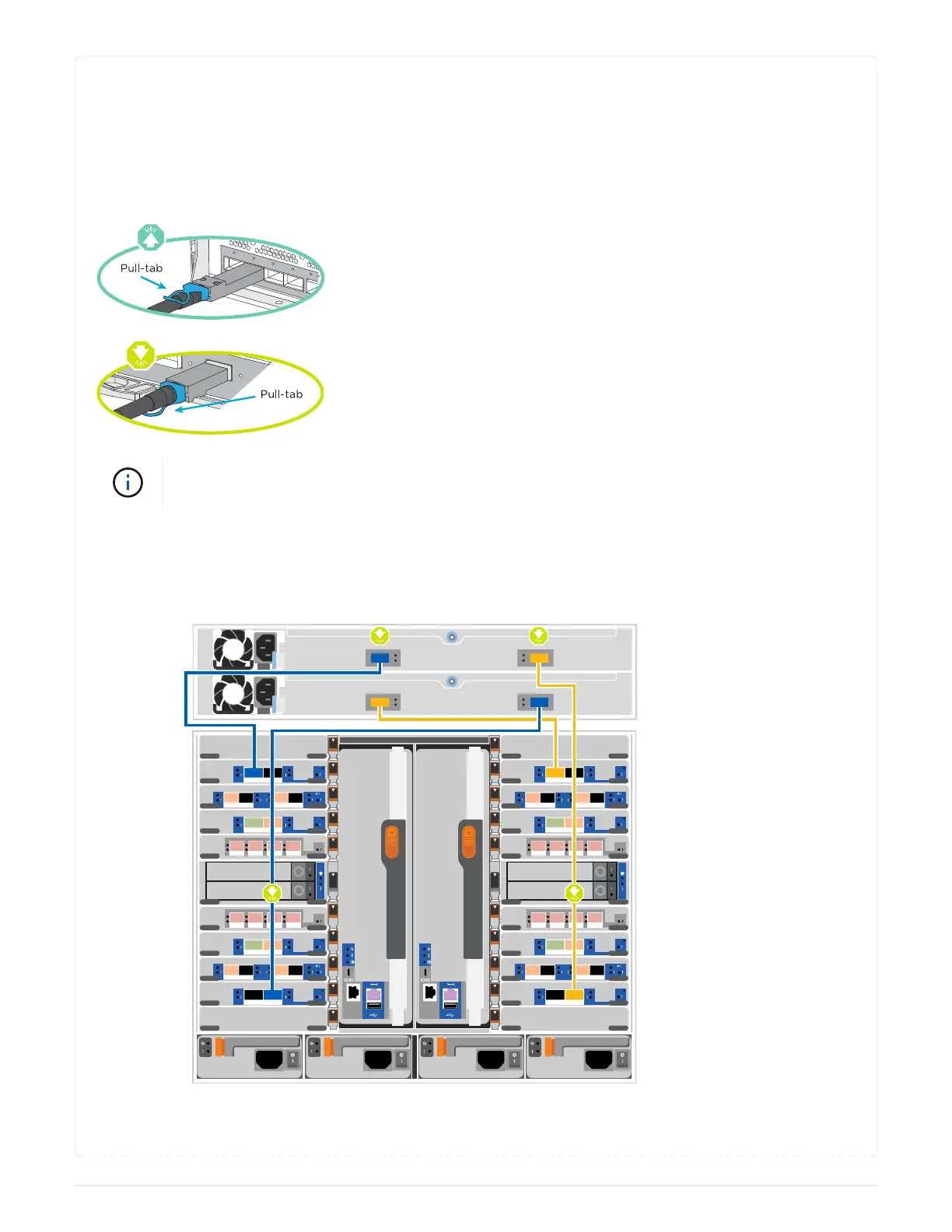
Option 1: Cable the controllers to a single NS224 drive shelf
You must cable each controller to the NSM modules on the NS224 drive shelf on an AFF A900 system.
Before you begin
• Be sure to check the illustration arrow for the proper cable connector pull-tab orientation. The cable
pull-tab for the storage modules are up, while the pull tabs on the shelves are down.
As you insert the connector, you should feel it click into place; if you do not feel it click,
remove it, turn it around and try again.
1. Use the following animation or drawings to cable your controllers to a single NS224 drive shelf.
Animation - Cable a single NS224 shelf
B5
B6
B4
B3
B2
B1
B10
B9
B8
B7
B11
A5
A6
A4
A3
A2
A1
A10
A9
A8
A7
A11
6- 2
6- 1
a b c d
a b
a b
a b
6- 2
6- 1
a
b
c
d
a b c d
a b c d a b c d
a b
a b
a b
a b a b
a
b
c
d
a
b
c
d
a
b
c
d
Shelf 1
NSM A
NSM B
e0a
e0a
e0b
e0b
Controller A Controller B
691



 To Next Page