Make sure that you support the bottom of the controller module as you slide it out of the chassis.
7. Place the controller module on a stable, flat surface.
Step 3: Replace the NVDIMM battery
To replace the NVDIMM battery, you must remove the failed battery from the controller module and install the
replacement battery into the controller module. See the FRU map inside the controller module to locate the
NVDIMM battery.
The NVDIMM LED blinks while destaging contents when you halt the system. After the destage is complete,
the LED turns off.
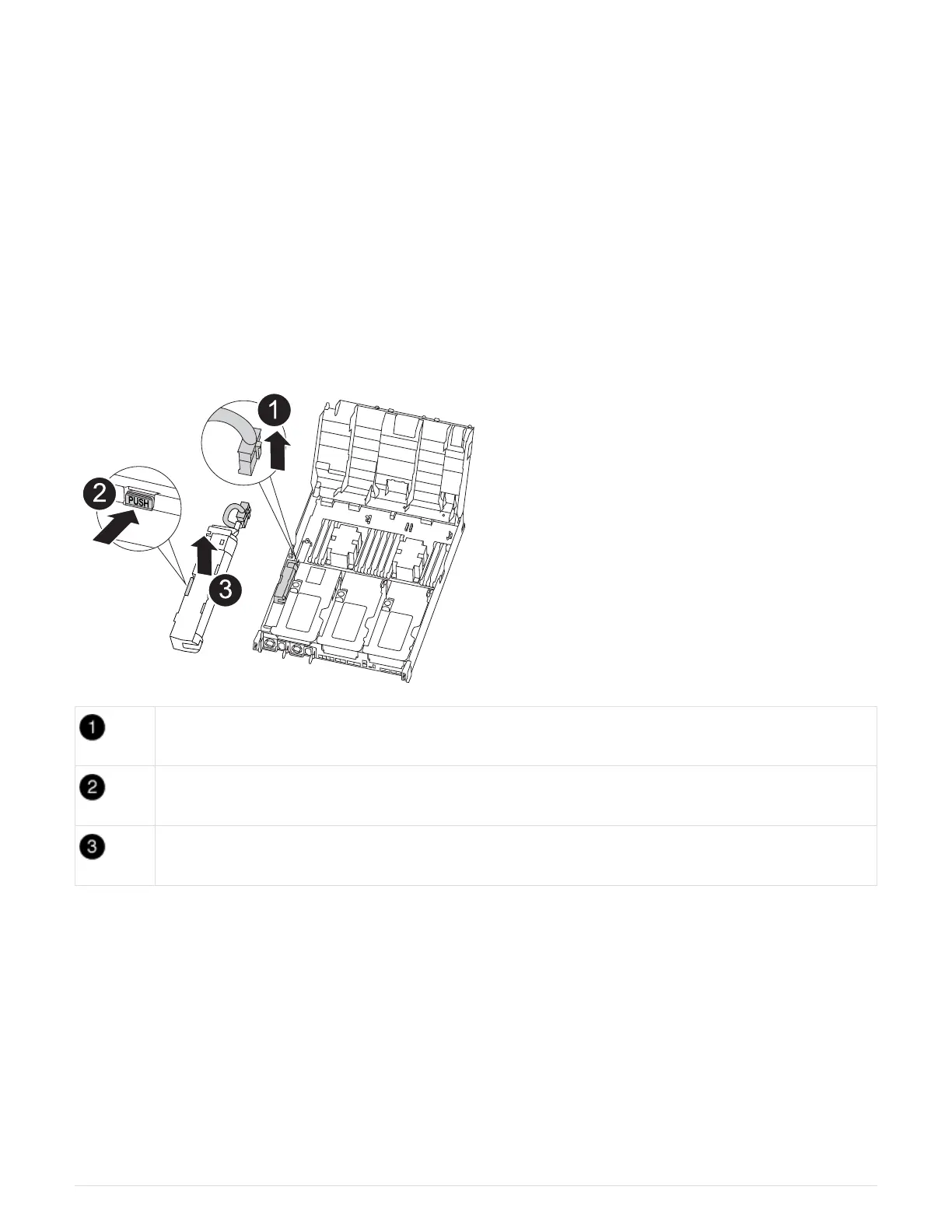
You can use the following animation, illustration, or the written steps to replace the NVDIMM battery.
Animation - Replace the NVDIMM battery
Battery plug
Locking tab
NVDIMM battery
1. Open the air duct:
a. Press the locking tabs on the sides of the air duct in toward the middle of the controller module.
b. Slide the air duct toward the back of the controller module, and then rotate it upward to its completely
open position.
2. Locate the NVDIMM battery in the controller module.
3. Locate the battery plug and squeeze the clip on the face of the battery plug to release the plug from the
socket, and then unplug the battery cable from the socket.
4. Grasp the battery and press the blue locking tab marked PUSH, and then lift the battery out of the holder
and controller module.
76



 To Next Page