Locking latch
Locking pin
7. Slide the controller module out of the chassis.
Make sure that you support the bottom of the controller module as you slide it out of the chassis.
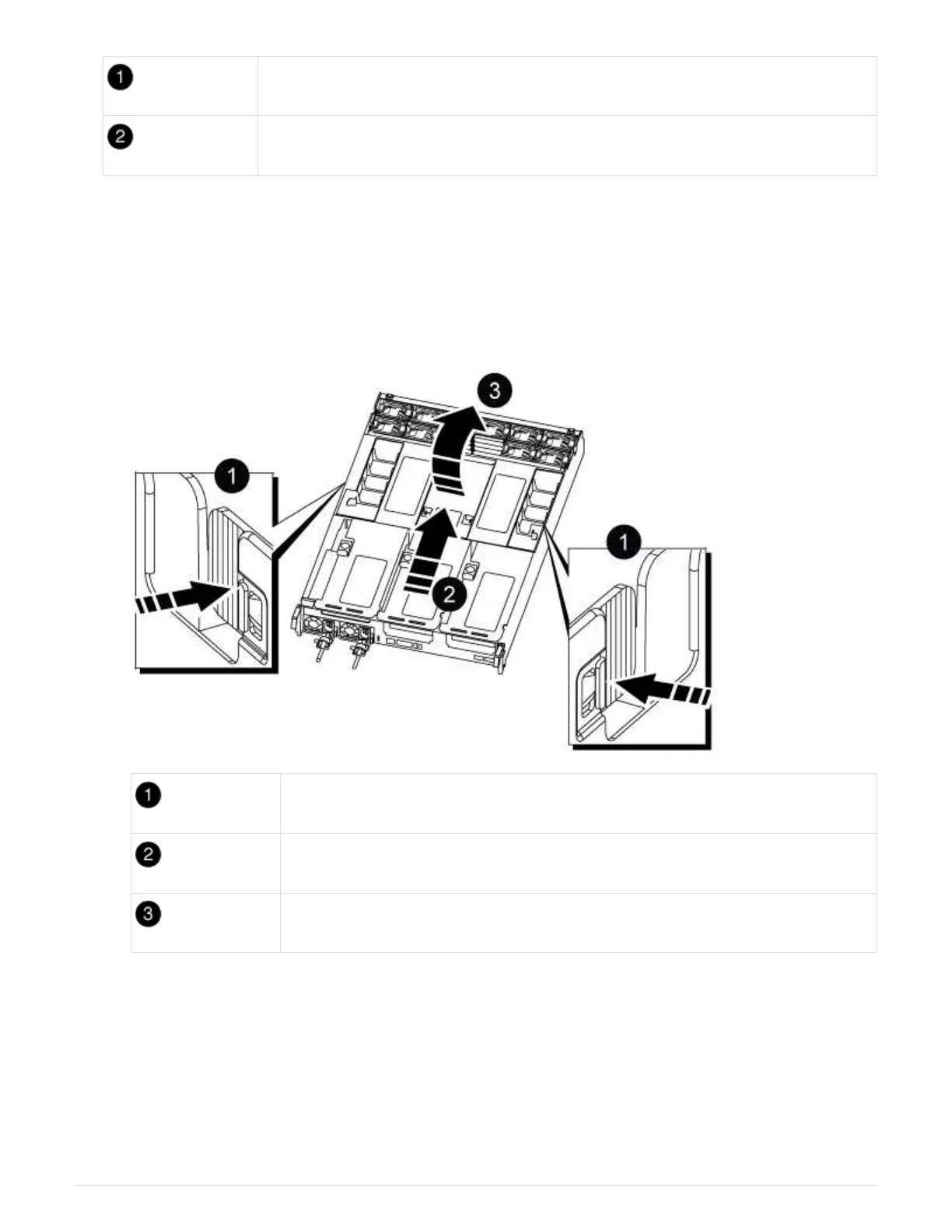
8. Place the controller module on a stable, flat surface, and then open the air duct:
a. Press in the locking tabs on the sides of the air duct toward the middle of the controller module.
b. Slide the air duct toward the fan modules, and then rotate it upward to its completely open position.
Air duct locking tabs
Slide air duct towards fan modules
Rotate air duct towards fan modules
Step 3: Replace a PCIe card
To replace a PCIe card, you must remove the cabling and any QSFPs and SFPs from the ports on the PCIe
cards in the target riser, remove the riser from the controller module, remove and replace the PCIe card,
reinstall the riser and any QSFPs and SFPs onto the ports, and cable the ports.
1. Determine if the card you are replacing is from Riser 1 or if it is from Riser 2 or 3.
◦ If you are replacing the 100GbE PCIe card in Riser 1, use Steps 2 - 3 and Steps 6 - 7.
1025



 To Next Page