Model FS102, Model FS104, Model FS108 Fast Ethernt Switch Installation Guide
Normal/Uplink Push Button
The Normal/Uplink push button on the front panel of the switch allows you to select uplink (MDI)
or normal (MDI-X) wiring for either of the Ethernet ports on the Model FS102 switch, port 4 on
the Model FS104 switch, or port 8 on the Model FS108 switch. These ports are configured for
normal wiring to connect to a PC when the push button position is out. When the push button is
pressed in, these ports are configured for uplink wiring to connect to another switch or to a hub,
using a straight-through twisted pair cable.
Rear Panel
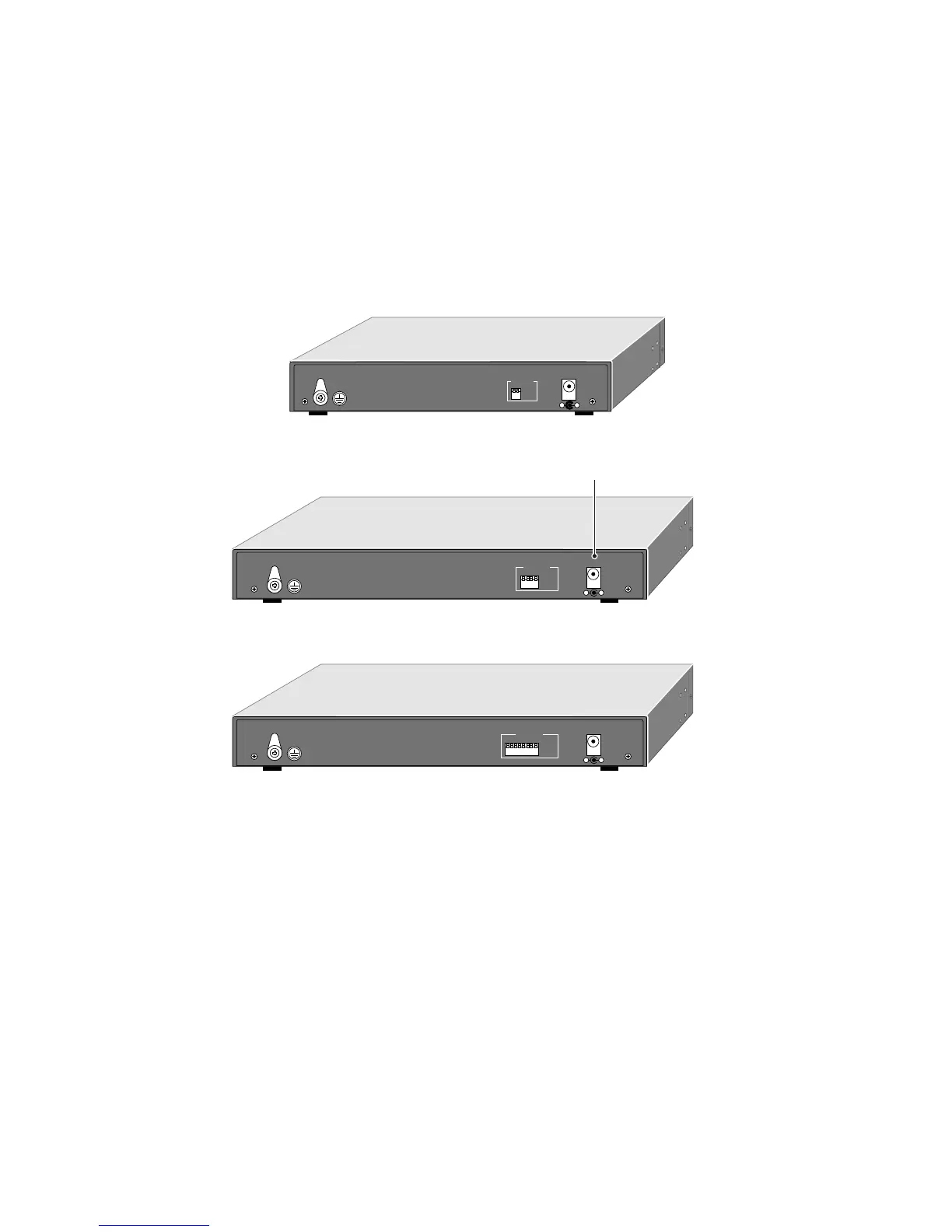
The rear panel of the Model FS102/FS104/FS108 switch has full-duplex (FDX) and auto-duplex
(AUTO) toggle switches and a power adapter receptacle for the supplied power adapter.
FDX/AUTO Duplex Toggle Switches
Full-duplex mode is supported for all 10/100 Mbps ports and allows the port to transmit and
receive data at the same time. Full-duplex operation applies only to point-to-point access (for
example, when a switch is connected to a PC, a server, or another switch).
Setting the toggle switch to AUTO on the 10/100 Mbps port enables the port to determine duplex
mode automatically. In this mode of operation, the 10/100 Mbps port operates in either full- or
half-duplex, depending on the operating mode of the remote port. If the remote port cannot
provide the proper signal to indicate its capability, the 10/100 Mbps port on the switch defaults to
half-duplex mode. Repeaters and hubs use a common collision domain for all communications
and cannot communicate in full-duplex mode. The associated 10 Mbps port on the switch should
be set to auto-duplex operation when connecting to these types of devices.
One toggle switch is assigned to each 10/100 Mbps port and can be set to full-duplex (FDX) mode
or auto-duplex (AUTO) mode.
12Vdc 1.2A
– +
12Vdc 1.2A
– +
8901FA
Rear Panel of the Model FS102 switch
Rear Panel of the Model FS104 switch
Rear Panel of the Model FS108 switch
Power receptacle
1
4
FDX
AUTO
10/100 Mbps
FDX -
AUTO -
Force port to operate at Full Duplex and Half Duplex mode.
Enable port to determine duplex mode
automatically. Default is Half Duplex.
12Vdc 1.2A
– +
1234567
8
FDX
AUTO
10/100 Mbps
FDX -
AUTO -
Force port to operate at Full Duplex and Half Duplex mode.
Enable port to determine duplex mode
automatically. Default is Half Duplex.
1
2
FDX
AUTO
10/100 Mbps
FDX -
AUTO -
Force port to operate at Full Duplex and Half Duplex mode.
Enable port to determine duplex mode
automatically. Default is Half Duplex.




 To Next Page