26
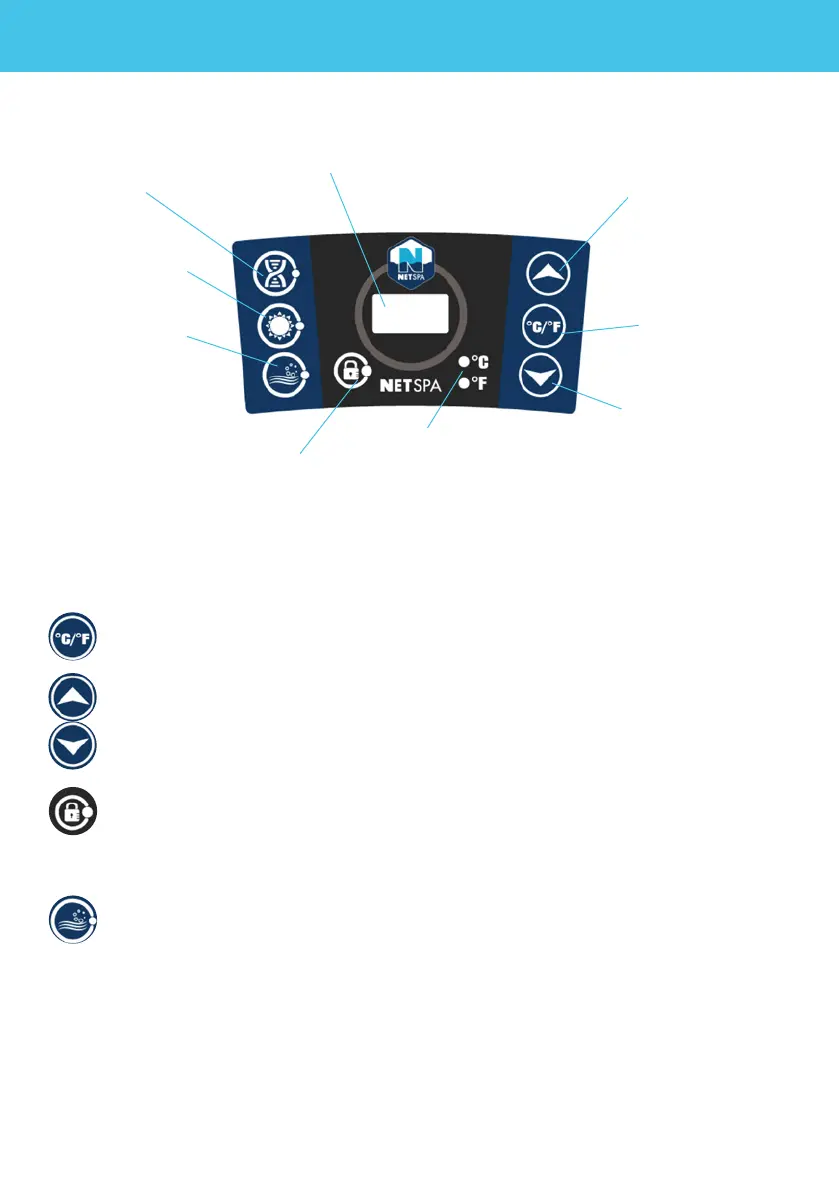
Once powered-up, the LED displays the current water temperature automatically.
The temperature units selector changes the temperature units from Celsius de-
grees to Fahrenheit degrees.
Press the temperature adjustment buttons, then the screen will ash. When it is
ashing, you can set the desired temperature. The value will increase or decrease
1 degree at once. The temperature could be set between 30°C to 42°C (86°F to
107°F).
To lock or unlock the control panel, press the Lock button and hold 3 seconds.
Lock the control panel when you are away to prevent other people come to
change your settings..
Press the massage button to activate the bubble massage system, the green
indicator light turns on. It can be turned o by pressing it again.
Note :
- The massage system will stop automatically after 30 minutes of operation. Re-activate the mas-
sage function by pressing the massage button again.
- When lter button is on, pressing bubble button will exchange lter mode into massage mode: lter
indicator light will turn off and massage indicator light turn on. If press the bubble button again, the
massage mode will be changed back to lter mode.
4. USAGE
4.1. Control panel
4.2. Functions
Filtration
Decrease
temperature
Increase
temperature
Screen
Massage
Lock control
panel
Temperature
units indicator
Temperature
units
selector
Heater


 To Next Page