INS_NWK1_NWK2_QS_REV– 07/7/15 PAGE 2
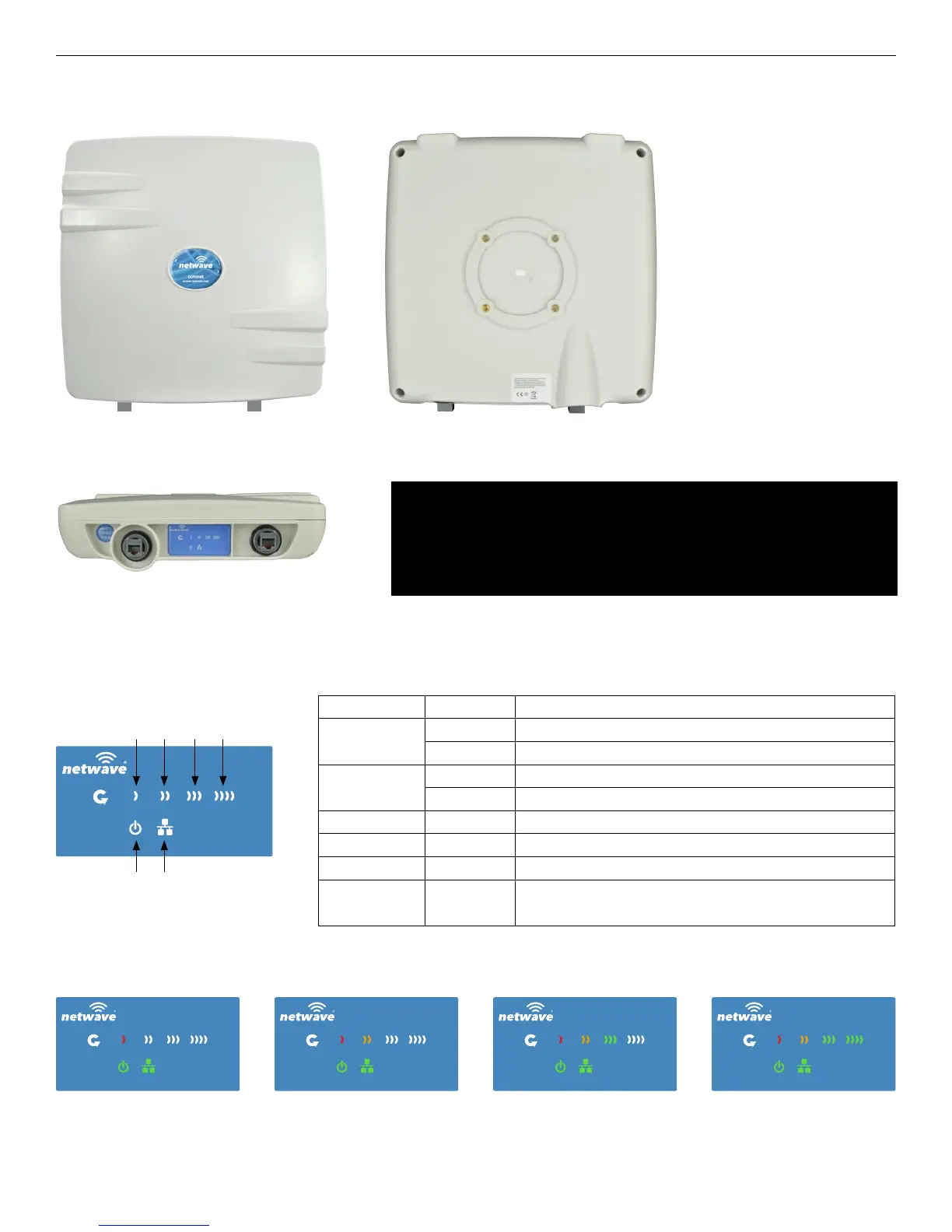
FIGURE 1 – INDUSTRIAL WIRELESS ETHERNET LINK
QUICK START USER GUIDE NWK(1,2)
TECH SUPPORT: 1.888.678.9427
FIGURE 2 – STATUS INDICATING LEDS
WEAK SIGNAL EXCELLENT SIGNAL
LED VISUAL CUE INDICATION
POWER
SOLID GREEN Power is supplied to the unit
OFF No power is supplied to the unit, or the unit is in reset.
LAN
SOLID GREEN LAN Connected
OFF No Connectivity
RSSI1 SOLID RED Weak Connection
RSSI2 SOLID ORANGE Moderate Connection
RSSI3 SOLID GREEN Solid Connection
RSSI4 SOLID GREEN
Excellent Connection
(Advisable to check Status Page to confirm RSSI is > -55)
SIGNAL STRENGTH:
RSSI1POWER
RSSI2LAN
RSSI3
RSSI4
BACKFRONT
BOTTOM
PORT 1PORT 2
IMPORTANT: Only plug PoE power to Port 1.
Connecting a PoE power source to the PSE Port (#2) will
cause a major device malfunction and void the warranty.
PORT 1 PORT 2



 To Next Page