KH 810/870 | 33
RS-232
control
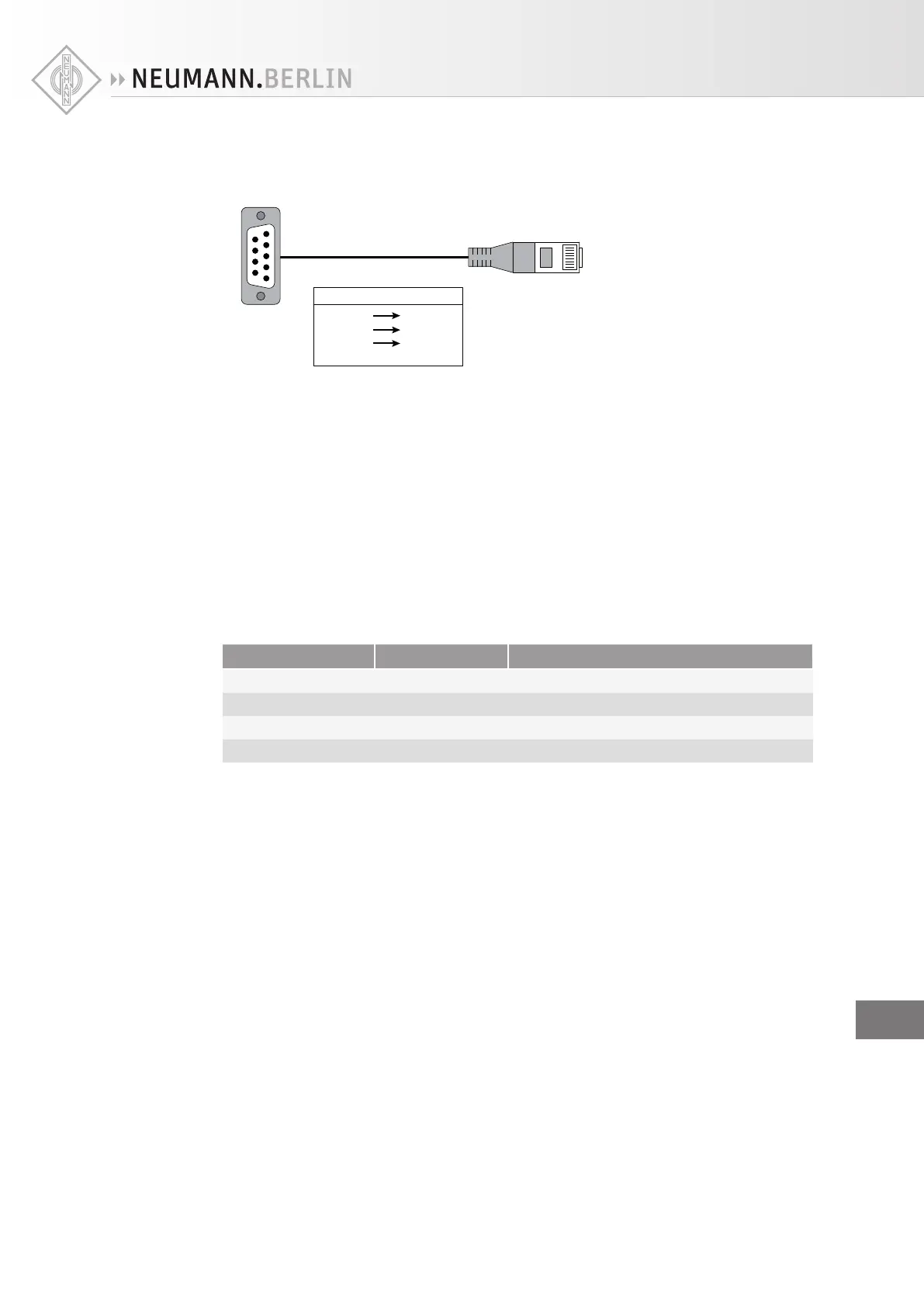
If the control equipment outputs RS-232 data on D-sub connectors, an RS-232 to CAT5 cable is
required. Only pins 3, 4 and 5 should be connected. Pins 4 and 5 should be crossed over, i.e. TX con-
nects to RX and vice versa.
5
1
9
6
1
8
D-Sub Pin CAT-5 Pin
2 (RX) 4 (TX)
3 (TX) 5 (RX)
5 (GND) 3 (GND)
Do not connect shield
RS-232 D-sub to CAT5 adapter
If the control equipment has a USB connector, for example a computer, a USB to RS-232 adapter is
required – these are available from most large computer shops. Once the USB is converted to RS-232,
an RS-232 to CAT5 adapter is required to connect to the subwoofer (see diagram above). Only connect
the three pins indicated in the diagram otherwise damage may occur to the USB to RS-232 adapter.
Volume
control
The VOL stages are located at the main channel outputs of the 7.1 High Definition Bass Manager™ and
the subwoofer output. As a result, they can be used for controlling the replay level of the entire sys-
tem or for remotely trimming individual loudspeaker levels.
Consequently, they cannot be used to replicate signal SOLO or SELECT type functions as seen in mix-
ing consoles. However, it is possible to MUTE and SOLO one or more of the loudspeaker outputs using
an RS-232 control.
This is useful when setting up the system – play some bass-heavy material at high levels with all the
main loudspeakers muted (subwoofer is soloed) to find the source of rattles in the listening room.
Using subwoofer mute and bass management together gives some useful additional functionality:
Bass management Subwoofer Bass extension (-3 dB)
ON ON 18 Hz
ON MUTED 80 Hz
DISABLE ON Main loudspeaker’s LF cut-o
DISABLE MUTED Main loudspeaker’s LF cut-o
EN


 To Next Page