Need help?
Do you have a question about the Neumann.Berlin MA 1 and is the answer not in the manual?
Lists necessary hardware for MA 1 setup and operation.
Details the software and OS prerequisites for MA 1 installation and use.
Identifies compatible DSP monitors controllable via network for alignment.
Lists analog monitors requiring a networked subwoofer for system setup.
Explains incompatibility and usage rules with the Neumann.Control iPad app.
Illustrates the physical connection of all system components like monitors and interface.
Guides on setting physical switches and level adjustments on loudspeakers/subwoofers.
Initiates the guided wizard for automatic monitor system alignment.
Specifies the network interface connecting to studio monitors and subwoofer.
Defines and configures the studio monitors and subwoofer for the system.
Configures the audio interface and selects correct input/output channels.
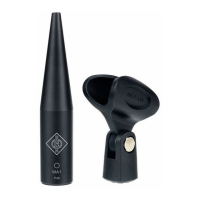
Enters serial number and compensation code for the MA 1 measurement microphone.
Mutes monitors and measures to determine ideal output signal level for the audio chain.
Details arrangement of loudspeakers and microphone for accurate measurements.
Checks microphone gain, background noise, and input signal routing before measurement.
Validates environmental and system readiness, including noise levels, for measurements.
Explains the orange target and white aligned system response curves shown after measurement.
Selects and enables specific EQ filters to modify the target response curve.
Realizes the alignment of the loudspeakers to the modified target response.
Describes how to access different software sections like Monitor Control and Help.
Accesses and activates saved hardware setups for the connected system.
Selects and sends saved alignment parameters to the active speaker setup.
Controls the overall system volume using a fader and input field.
Enables or disables the bass management function for subwoofers.
Modifies the brightness of the illuminated Neumann logo on DSP loudspeakers.
Performs a single measurement to evaluate positional changes for acoustic optimization.
Addresses issues with the audio interface not appearing in the MA 1 software dropdown.
Resolves messages about level differences between left and right channels during adaptation.
Troubleshoots cases where no microphone signal is detected by the MA 1 software.
 General
| Brand | Neumann.Berlin |
|---|---|
| Model | MA 1 |
| Category | Microphone |
| Language | English |

 To Next Page