EasyManua.ls Logo

Nevco 519 Wrestling - User Manual

Default Icon
34 pages
Print Icon
To Next Page IconTo Next Page
Loading...
1/21/2011 135-0058
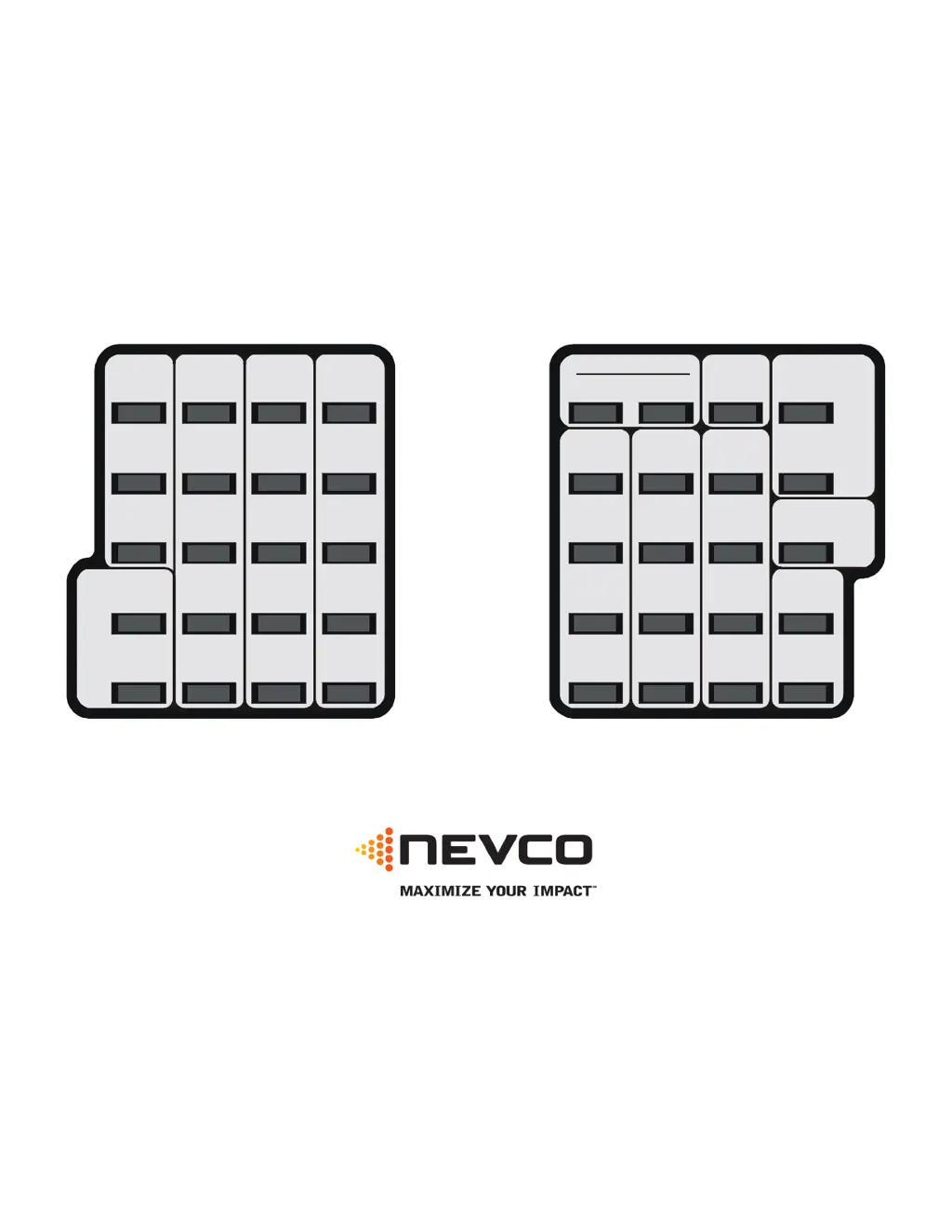
Scoreboard Operator’s Instructions
MPC Control
Home
Score
Guest
Score
Start
Clear
Confirm
Cancel
7
4
1
8
5
2
Blank
9
6
3
0
No
Yes
Chronometer
(Time of Day)
Options
Time Out Timer
Time
Alternate Time
Control
Horn
Set
Time
On
Time
Off
Model Code 519
Wrestling
Adv.
Time
Reset
Home
Match
Score
Guest
Match
Score
Guest
Adv.
Home
Adv.
Weight
Class
Adv.
Time
Out
Some features on the keyboard overlay may not be included on the particular model being operated.
Since 1934
Retain this manual in your permanent files

Questions and Answers

  • J
    jason93Aug 13, 2025
    What to do if the horn does not sound when the time has expired on my Nevco 519 Wrestling Sports & Outdoors equipment?
    • A
      andrewleeAug 13, 2025
      If the horn on your Nevco Sports & Outdoors equipment isn't sounding when the time expires, the auto horn may be turned off. Enable the auto horn by using the command SET HORN YES.
  • M
    Michelle MatthewsAug 17, 2025
    Why can't I save a bookmark on my Nevco 519 Wrestling device?
    • M
      Megan PittmanAug 17, 2025
      You cannot save a bookmark on your Nevco Sports & Outdoors equipment because the time is running. Turn the time off before saving a bookmark.
  • B
    Brian KennedyAug 21, 2025
    What to do if I cannot subtract from the score on my Nevco 519 Wrestling Sports & Outdoors scoreboard?
    • J
      Joseph RomeroAug 21, 2025
      If you cannot subtract from the score on your Nevco Sports & Outdoors scoreboard, it's because the score keys are set to add only. To enter a lower score, use SET, then the score key, and enter the correct score directly.
  • C
    Cody BassAug 25, 2025
    What to do if the timer counts in the wrong direction on my Nevco 519 Wrestling equipment?
    • C
      Christopher GonzalesAug 25, 2025
      If the timer on your Nevco Sports & Outdoors equipment is counting in the wrong direction, it means the timer direction is set incorrectly. Use SET OPTIONS to change the timer direction.
  • H
    Harry ThomasAug 28, 2025
    What to do if time is counting but the period is wrong on my Nevco 519 Wrestling Sports & Outdoors scoreboard?
    • M
      millerraymondAug 28, 2025
      If time is counting but the period displayed is wrong on your Nevco Sports & Outdoors scoreboard, it indicates that the wrong period was entered during the time setting. Press SET TIME NO and enter the correct period number.
  • R
    Roger DixonAug 31, 2025
    Why won't the CHRONOMETER display on the scoreboard when I press CHRONOMETER on my Nevco 519 Wrestling equipment?
    • M
      Michael JonesSep 1, 2025
      If the CHRONOMETER won't display on your Nevco Sports & Outdoors scoreboard when you press the CHRONOMETER key, it means the CHRONOMETER key is not enabled. Use SET CHRONOMETER to enable it.
  • B
    Brian LeeSep 5, 2025
    What to do if penalty timers are not running on my Nevco 519 Wrestling Sports & Outdoors scoreboard?
    • A
      Amber ColonSep 5, 2025
      If the penalty timers are not running on your Nevco Sports & Outdoors scoreboard, it means they have been turned off. Press the Penalty On Off key to activate them.
  • J
    Jennifer JohnsonSep 8, 2025
    How to clear Time Out Timer from Nevco 519 Wrestling scoreboard without sounding horn when teams are ready to play?
    • L
      Linda ColeSep 8, 2025
      To clear the Time Out Timer from your Nevco Sports & Outdoors scoreboard without the horn sounding (when teams are ready to play), set up another Time Out Timer that doesn't have a warning time and doesn't display on the scoreboard. Interrupt the unneeded Timer with this one, and then clear it.

Nevco 519 Wrestling Specifications

General IconGeneral
BrandNevco
Model519 Wrestling
CategorySports & Outdoors
LanguageEnglish

Related product manuals