Your HF10 Trial Device Guide
For Patients in the Trial Phase
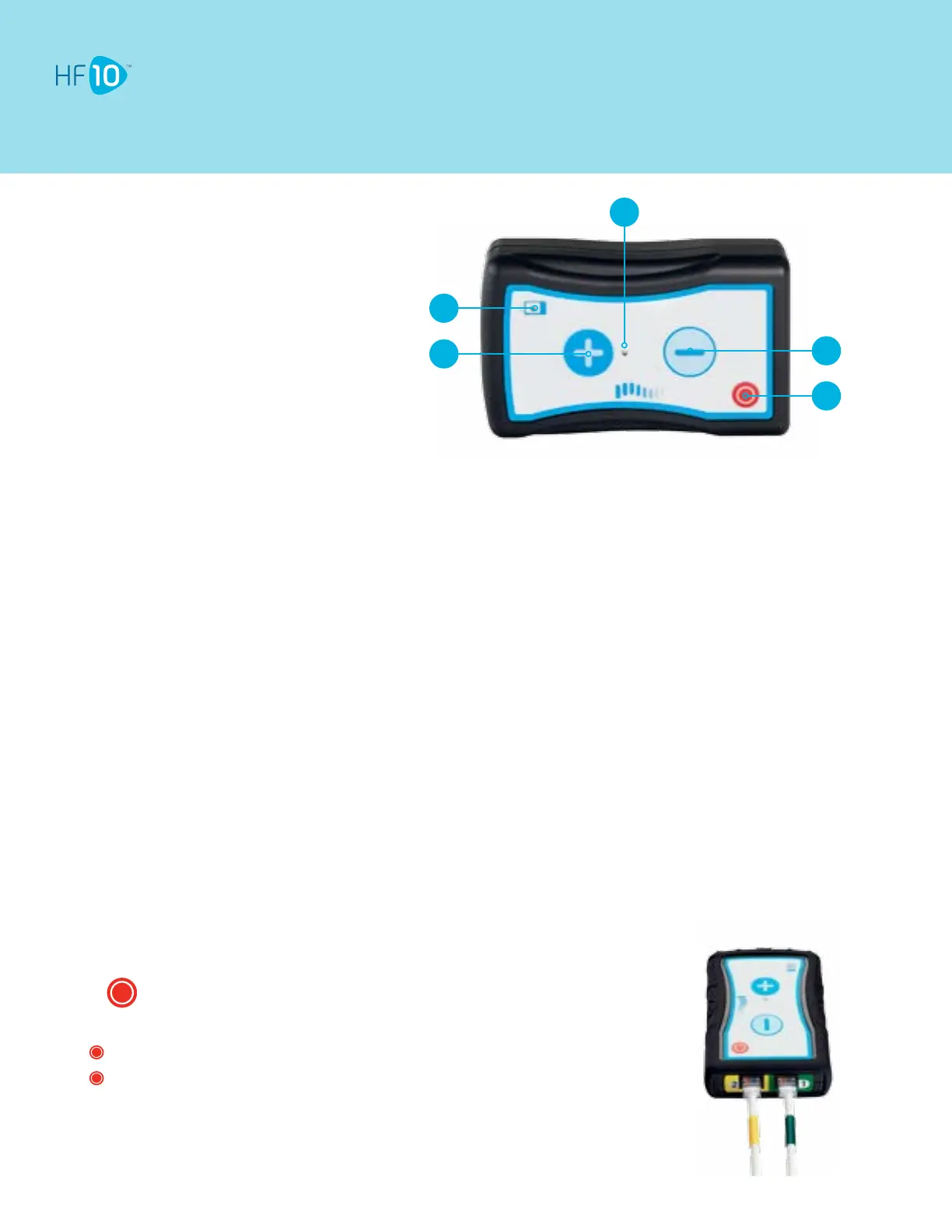
1. Stimulation Increase Button
2. Low Battery Indicator Light
3. Stimulation ON Indicator Light
4. Stimulation Decrease Button
5. Stimulation OFF Button
1
2
3
5
4
•
Your Trial Device delivers the stimulation to the leads.
•
Although many buttons are present on this device, you will make nearly all stimulation changes using your Remote
Control.
•
Remember, to achieve optimal relief, make sure you work closely with your HF10 representative before making changes
to the settings.
•
Be sure to keep the Trial Device dry.
•
ChecktheStimulatorONIndicatorLighttwotimesperdaytoconrmHF10 is on.
Tips
Default mode of the Trial Device
• In the default mode, the plus and minus buttons are locked. This feature prevents accidental
pressing of the buttons, which can change the settings.
• When locked, only the Stimulation OFF Button will respond.
• In the locked state, you can still receive HF10.
• Stimulation settings can be changed with the Remote Control.
Turning stimulation OFF
Press .
• Stimulation ON Indicator Light will turn OFF.
• only turns stimulation OFF. It does not turn stimulation ON.
• will turn stimulation OFF, even while the Trial Device’s buttons are locked.



 To Next Page