11
How to turn stimulation ON and change programs
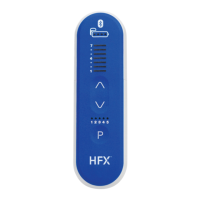
To turn stimulation ON, make sure your remote control is ON.
Stimulation is ON unless it has been turned OFF.
1. If the Simulator Level Indicator isn’t
illuminated, stimulation is OFF.
2. Press the Stimulation Start/Increase Button
once to turn stimulation ON to predetermined level.
• When stimulation is turned ON (after it was turned OFF),
your device will be on the starting level for the last
active program you used.
3. To change the program, press the Program Selection
Button. Press the Program Selection Button repeatedly
until the light is at your desired program number.
• Once your desired program is selected, don’t press
any buttons until the light stops blinking. You will hear
1 beep from your remote control, conrming your
new program setting.
4. Make sure the light above your program number
is brightly illuminated.
If your remote control beeps
3 times and the program
indicator goes back to
the previous program,
then your program wasn’t
successfully changed.
Place your remote control
closer to your device and
repeat the previous steps.
If you’re using a PTRC2300 remote
control, you will see 3 Programs above
the Program Selection Button.
For Implanted Patients
(PTRC2300/PTRC2500/PTRC3000)
How to Use Your Remote Control
Note
2
3
4
1


 To Next Page
 Loading...