4
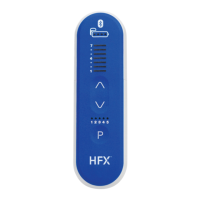
How to turn your remote control ON
1. Press and hold the Remote Control ON/OFF Button
until you hear a long beep.
• You may need to press the Remote Control
ON/OFF Button for up to 5 seconds.
How to turn your remote control OFF
1. Press the Remote Control ON/OFF Button
to turn OFF your remote control.
• Stimulation continues even when your remote control is OFF.
• Your remote control will turn OFF by itself after 2 minutes of inactivity.
Tips
• If your remote control syncs with your trial device, at least 1 LED light on your remote control will
light up and you’ll hear 1 beep.
• If your remote control can’t sync with your trial device, you will hear 3 beeps and the lights on your
remote control will turn OFF.
• Repeat these steps until you have a connection with your trial device. Moving your remote control
closer to your trial device may help.
• Other buttons on your remote control will respond only when your remote control is ON and
connected to your trial device.
1
For Trial Patients
(TSM3000/TSM3500)
How to Use Your Trial Device


 To Next Page
 Loading...