9
Your Nevro HFX Care Team will provide guidance on
how and when to use your remote control.
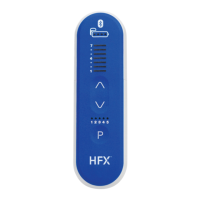
Get familiar with your remote control
1. Remote Control ON/OFF Button
2. Stimulation OFF Button
3. Battery Level Indicator
4. Stimulation Level Indicator (“Ladder Lights”)
5. Stimulation Start/Increase Button
6. Stimulation Decrease Button
7. Program Indicator
8. Program Selection Button
Implant guidelines
• When to replace your remote control batteries:
• Your remote control beeps 6 times when turned on.
• Your remote control will not turn on.
• It’s been 3 months since your last battery change.
• When your Battery Level Indicator shows 2 dots or
fewer, your battery needs to be recharged using
your charger.
• To achieve the best pain relief possible, make sure
you work closely with your Nevro HFX Care Team to
nd which programs work best for you.
Your remote control
uses 2 AAA batteries,
alkaline only.
DO NOT USE lithium or
rechargeable batteries.
MDSS GMBH | Schiffgraben 41 R
Ph
N
D-30175 Hannover,Germay
REPEC
2
1
For Implanted Patients
(PTRC2300/PTRC2500/PTRC3000)
How to Use Your Remote Control
If you’re using a PTRC2300 remote
control, you will see 3 Programs above
the Program Selection Button.
Note
6
7
8
5
3
4


 To Next Page
 Loading...