21
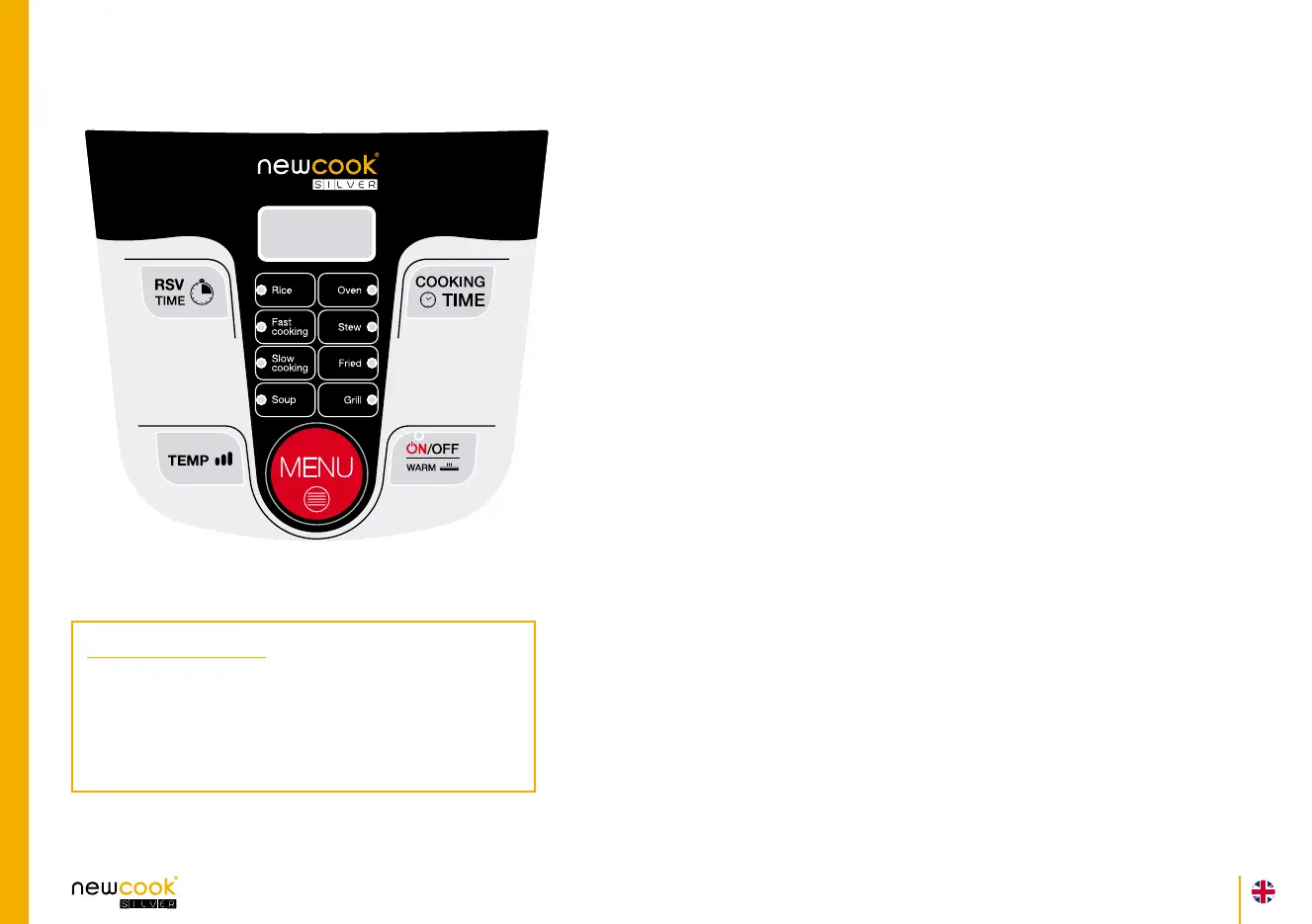
BUTTONS
ON: Press this button to start the cooking cycle, press it after selecting
the menu or the waiting time.
OFF: Press this button three times to cancel any function. When the
warm function is on, press OFF to cancel , the display shows “0000”.
Warm: This function connects automatically after each menu cycle
when the cooker nishes cooking and indenitely until you cancel it.
Press this button to select the keep warm function, in display “----”.
Menu: Press this button to select the required menu. It will bright.
Temp: Press this button to change the power / temperature at any
time. The cooking power is indicated with the digits shown on the left of
the display screen. There are a total of 3, with 1 being the lowest and 3
the highest. Temperature 2 is selected by default (for any menu) except
for frying, that you can use temperature 3.
Cooking time: Press this button to increase the cooking time before
select the Menu (minutes). If you hold down the button will increase the
time in 10 minute intervals.
RSV: Press this button to set the waiting time, the robot will cook
automatically. If you hold down the button will increase the time in 10
minute intervals.
I M P O R T A N T
Temp 1: use only to heat
Temp 2: always use it for cooking
Temp 3: use only with open lid for frying


 To Next Page