EasyManua.ls Logo

NewTek NDI HX-PTZ2 - User Manual

NewTek NDI HX-PTZ2
46 pages
Print Icon
To Next Page IconTo Next Page
Loading...
Page | i
t
NewTek NDI|HX-PTZ2
IP Video Camera
Operating Instructions
Question and Answer IconNeed help?

Do you have a question about the NewTek NDI HX-PTZ2 and is the answer not in the manual?

Summary

Section 1: Introduction and Setup

1.1 Overview

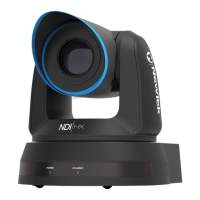
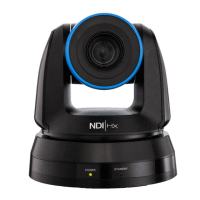
General introduction to the NewTek NDI|HX-PTZ2 camera and its capabilities.

1.2 Getting Ready

Instructions for downloading the NDI|HX driver and NDI Tools Pack for setup.

1.3 Making Connections

Details on connecting the camera to power and the network using Ethernet.

1.4 Web Configuration

Information on accessing the camera's configuration webpage via a web browser.

1.4.1 Studio Monitor

How to use the NDI Studio Monitor application to locate and view camera output.

Locating Camera on Network (Windows)

Steps to find and select the camera within NDI Studio Monitor on Windows.

Locating Camera on Network (OS X)

Steps to find and select the camera within NDI Studio Monitor on OS X.

1.4.2 Logging In

Instructions for logging into the camera's web interface with default credentials.

1.5 Video Source

Overview of the Video Source tab in the camera's web interface.

1.5.1 Video Bandwidth

Options for selecting video bandwidth (Low, Medium, High) for optimal network performance.

1.5.2 Pan, Tilt and Zoom

Details on using the Pan, Tilt, and Zoom controls, including presets.

Section 2: Audio Video Settings

Camera Video Settings

Controls for camera video parameters like exposure, picture, white balance, and focus.

Audio Settings

Controls for audio input levels, output, and volume.

2.1 Administration

Access to device name, firmware, password, and network settings.

2.1.1 Multicast

Configuration for multicast video transmission and network switch types.

2.1.2 Network Settings

Details on configuring IP address settings (Dynamic/Manual).

2.2 Tally

Explanation of tally light indicators for program and preview status.

Section 3: Remote Control & OSD

3.1 Remote Control

Identification and description of buttons on the NDIHX-PTZ2 remote control.

3.2 OSD Menu

Details of options available in the camera's On-Screen Display (OSD) menu.

Section 4: Mounting NDIHX-PTZ2

4.1 Preparation

Information on preparing for camera installation and ensuring safety.

4.1.1 Other Precautions

Specific precautions for handling and transporting the camera head.

4.2 Ceiling Mounting

Steps and considerations for mounting the camera on a ceiling.

4.3 Removal

Instructions for safely removing the camera from its mounting.

Section 5: About NDI

5.1 NDI Video Internet Concept

Explains NDI's concept as a 'video internet' for network-based video transport.

5.2 NDI Benefits

Discusses the advantages of using NDI for video production and distribution.

5.3 NDI Webcam Input

How to use NDI Webcam Input to make NDI sources available as virtual webcams.

Section 6: End User License Agreement

6. Trademarks

Lists NewTek's registered trademarks and other brand names.

7. MPEG Licensing

Licensing requirements for using MPEG standards with the product.

10. US Government Provision

Specifies terms for US Government acquisition of the software.

11. General License Terms

General legal clauses governing the software license.

12. Australian Warranty

Specific warranty terms for Australian purchasers.

13. Content License Terms

Terms of use for provided content data like images and video clips.

14. TalkShow Product Provisions

Specific terms for the TalkShow product.

Credits

Summary

Section 1: Introduction and Setup

1.1 Overview

General introduction to the NewTek NDI|HX-PTZ2 camera and its capabilities.

1.2 Getting Ready

Instructions for downloading the NDI|HX driver and NDI Tools Pack for setup.

1.3 Making Connections

Details on connecting the camera to power and the network using Ethernet.

1.4 Web Configuration

Information on accessing the camera's configuration webpage via a web browser.

1.4.1 Studio Monitor

How to use the NDI Studio Monitor application to locate and view camera output.

Locating Camera on Network (Windows)

Steps to find and select the camera within NDI Studio Monitor on Windows.

Locating Camera on Network (OS X)

Steps to find and select the camera within NDI Studio Monitor on OS X.

1.4.2 Logging In

Instructions for logging into the camera's web interface with default credentials.

1.5 Video Source

Overview of the Video Source tab in the camera's web interface.

1.5.1 Video Bandwidth

Options for selecting video bandwidth (Low, Medium, High) for optimal network performance.

1.5.2 Pan, Tilt and Zoom

Details on using the Pan, Tilt, and Zoom controls, including presets.

Section 2: Audio Video Settings

Camera Video Settings

Controls for camera video parameters like exposure, picture, white balance, and focus.

Audio Settings

Controls for audio input levels, output, and volume.

2.1 Administration

Access to device name, firmware, password, and network settings.

2.1.1 Multicast

Configuration for multicast video transmission and network switch types.

2.1.2 Network Settings

Details on configuring IP address settings (Dynamic/Manual).

2.2 Tally

Explanation of tally light indicators for program and preview status.

Section 3: Remote Control & OSD

3.1 Remote Control

Identification and description of buttons on the NDIHX-PTZ2 remote control.

3.2 OSD Menu

Details of options available in the camera's On-Screen Display (OSD) menu.

Section 4: Mounting NDIHX-PTZ2

4.1 Preparation

Information on preparing for camera installation and ensuring safety.

4.1.1 Other Precautions

Specific precautions for handling and transporting the camera head.

4.2 Ceiling Mounting

Steps and considerations for mounting the camera on a ceiling.

4.3 Removal

Instructions for safely removing the camera from its mounting.

Section 5: About NDI

5.1 NDI Video Internet Concept

Explains NDI's concept as a 'video internet' for network-based video transport.

5.2 NDI Benefits

Discusses the advantages of using NDI for video production and distribution.

5.3 NDI Webcam Input

How to use NDI Webcam Input to make NDI sources available as virtual webcams.

Section 6: End User License Agreement

6. Trademarks

Lists NewTek's registered trademarks and other brand names.

7. MPEG Licensing

Licensing requirements for using MPEG standards with the product.

10. US Government Provision

Specifies terms for US Government acquisition of the software.

11. General License Terms

General legal clauses governing the software license.

12. Australian Warranty

Specific warranty terms for Australian purchasers.

13. Content License Terms

Terms of use for provided content data like images and video clips.

14. TalkShow Product Provisions

Specific terms for the TalkShow product.

Credits

NewTek NDI HX-PTZ2 Specifications

General IconGeneral
Frame RateUp to 60 fps
Pan Angle±170°
Presets100
Camera TypePTZ
Video OutputNDI
Video Resolution1920x1080
Sensor1/2.8" CMOS
LensOptical Zoom Lens
ApertureF1.6 ~ F3.5
Minimum Illumination0.5 Lux (F1.6, 50IRE)
Shutter Speed1/1 to 1/10000 sec
Audio Input3.5mm stereo mini jack
ConnectivityEthernet
Power12VDC
ControlNDI
AudioAAC

Related product manuals