Need help?
Do you have a question about the NewTek NDI-PTZ1 and is the answer not in the manual?
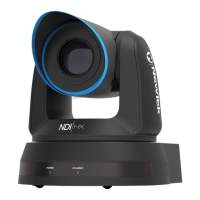
Provides an overview of the NewTek NDI-PTZ1™ camera and its capabilities.
Guides users on installing NDI|HX drivers and preparing the camera for use.
Details the physical connections required for the NDI-PTZ1 camera, including power and network.
Explains how to access and use the camera's web-based configuration interface.
Describes how to use the Studio Monitor application to access camera settings and NDI sources.
Details the process of logging into the camera's web interface using default credentials.
Configures video source settings, including video bandwidth and pan, tilt, zoom controls.
Adjusts video bandwidth options (Low, Medium, High) for optimal network performance.
Details how to use the pan, tilt, and zoom controls, as well as preset buttons.
Accesses advanced audio and video settings like exposure, picture, white balance, and focus.
Manages device name, firmware, network settings, password, and factory reset options.
Explains multicast video transmission and network requirements for its use.
Configures network settings, including IP address assignment (Dynamic or Static).
Describes the meaning of the camera's power and standby lights as tally indicators.
Details the buttons and functions of the included physical remote control for the camera.
Lists and describes the various settings available through the camera's On-Screen Display (OSD) menu.
Provides guidelines for safe and secure installation, including choosing a suitable location.
Details specific handling and transport precautions to avoid damaging the camera.
Instructions for securely mounting the camera on a ceiling using the supplied hanger and plates.
Steps for safely removing the camera from its mounting hardware.
Explains the concept of NDI as a network-based video distribution system.
Highlights the advantages of using NDI for IP video production and connectivity.
Describes the NDI Virtual Input application for using NDI sources as webcams.
Outlines the terms of the software license and limited warranty for the product.
Details the limitations and prohibitions on using, copying, and modifying the software.
Explains conditions under which the software license may be terminated.
Covers compliance with export and import laws and regulations.
Specifies warranty limitations, disclaimers, and limitations on liability for damages.
Lists NewTek trademarks and other brand names mentioned in the document.
Details general legal constructions and governing laws for the license agreement.
Outlines specific warranty terms applicable to Australian purchasers.
Defines terms for using content provided with the TriCaster, including images and video clips.
Specifies additional terms related to the TalkShow product and its software integration.
 General
| Video Resolution | Up to 1080p60 |
|---|---|
| Frame Rate | 60 fps |
| Optical Zoom | 20x |
| PTZ | Yes |
| Camera Type | PTZ |
| Video Output | NDI |
| Connectivity | Ethernet |
| Control Protocols | NDI |
| Power Supply | PoE+ (IEEE 802.3at) |
| Sensor Size | 1/2.8" |
| Pan Angle | 340° |
| Audio | Embedded audio via NDI, HDMI, and SDI |
| Presets | 255 presets |

 To Next Page