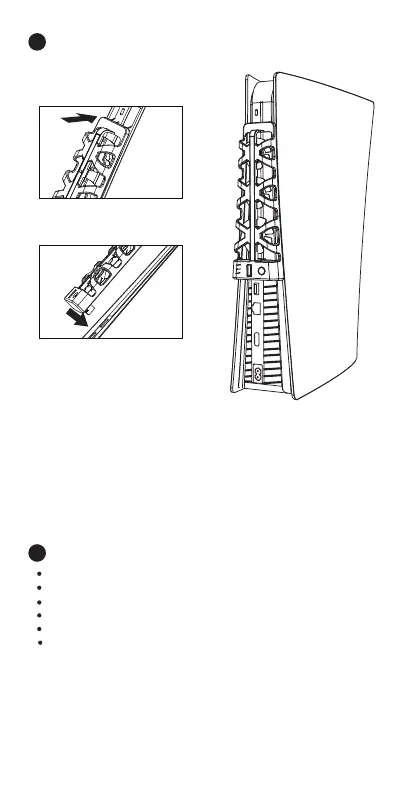
Step 1: Slide the hooks at the top of the fan into the
uppermost slots in the back grill of the PS5 console.
Step 2: Insert the USB fan power connector into the
upper USB port (it will be positioned right over the
correct port) at the back of the PS5 console
Step 3: The fan is now ready to use.
Installation Diagram
4
Specifications:
5
Working Voltage/Current: DC 5V/500mA
Fan Speeds: 5500±1100 rev/min
Product Size: 7.68 x 2.48 x 1.38 inches (L x W x H).
Product Material: ABS
Number of Fans: Three (3)
Product Compatibility: Compatible with PS5 Disc
and Digital Consoles.
Step 1
Step 2
US / 03


 To Next Page