ENG
MOBILEENTERTAINMENT
49OTHERS
BATTERYOPERATIONINSTRUCTION
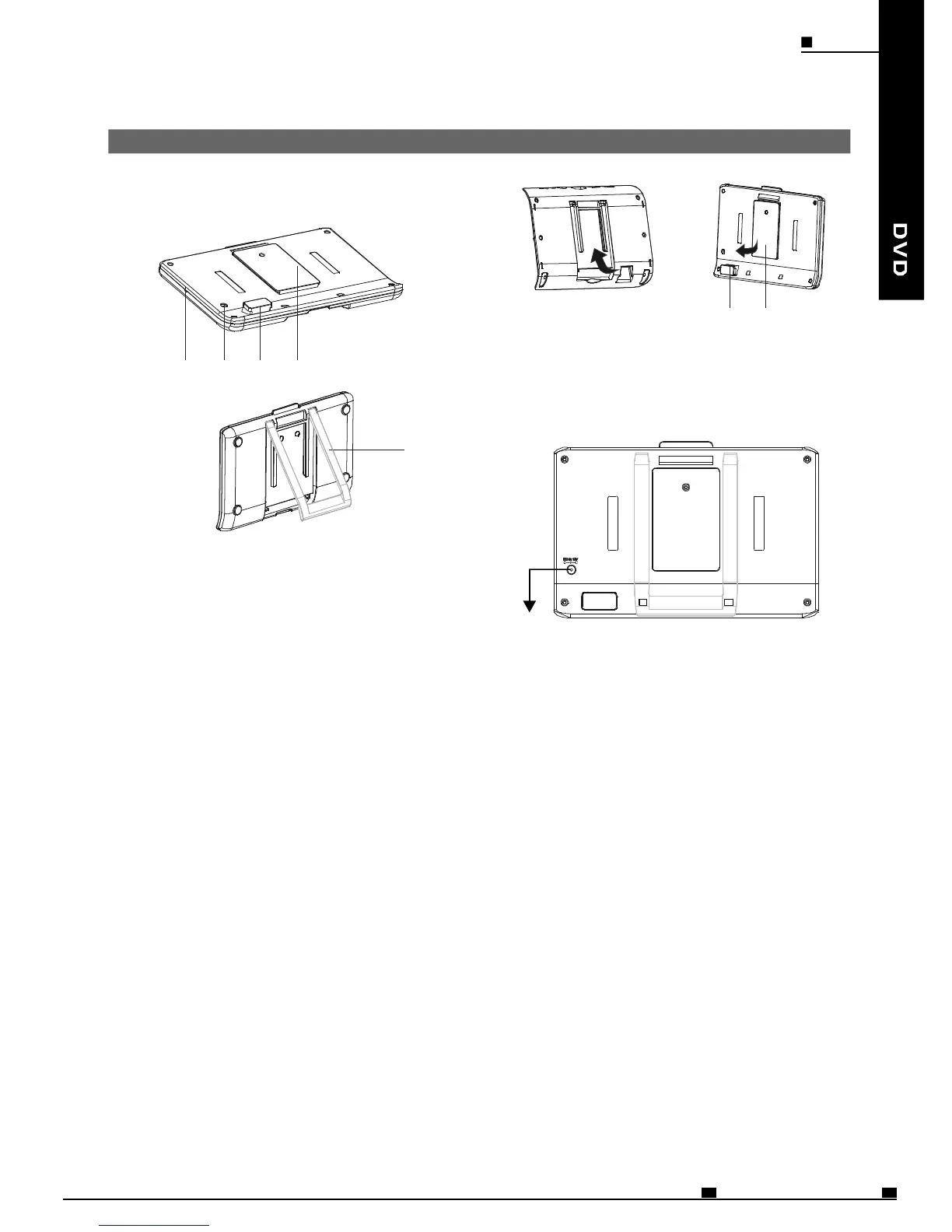
NAMESOFBATTERYPARTSANDTHEIR
FUNCTIONS
1
1
2
2
3
4
5
1DCINconnector
2Playerterminals
3BatteryindicatorLED
4Slidefittingmount
5batterystand
Connectthepoweradaptertorecharge.
Supplypowertotheplayer.
Donotshort-circuittheterminals.
Whenthebatteryisdischarging,LEDisoff.
Whenrechargingthebattery,LEDisred.
WhentheLEDturnsfromredtooff,itmeans
finishingrecharging.
ATTACHINGTHEBATTERYPACKTOTHE
PLAYER
1Attachthebatterypacktotherearofthe
DVDplayer.
2Slidethebatteryfromthebottom,inan
upwarddirection,toengagetheslidefitting
mount,Ensurethebatteryispushedtothe
topoftheslidetoengagetheconnection.
3Nowtheplayerwilloperatefromthebattery
supply.
BatteryBottom
1)Slidefittingmount
2)Batteryconnector
Note:
Remembertoinsertbacktherubbercover
oftheunittoBATTERYCONNECTORafter
usingthebatterypack.
RECHARGINGTHEBATTERYPACK
ConnecttheoutputplugofAC/DCadapter
tothebatterypack.
Notes:
1.Thebatterypackcanbeusedforabout300
cyclesofrechargingandoperations,though
thisisvariabledependingontheoperating
conditions.
2.Chargethebatterypackfullybeforeusingit
forthefirsttime.Placethebatterypackand
AC/DCadapteronaflatsurfacefor
recharging.Donotshort-circuittheterminals
ofthebatterypackandAC/DCadapter.If
thebatterypackisfullyrecharged,theplayer
canplayDVD
,
scontinuouslyforabout2
hours.
3.Thebatterycharger(AC/DCadapter)is
compatiblewithsupplyvoltagebetween
100Vand240VACandcanbeused
universally.Whenyouwanttouseitonan
overseastravel,besuretoprepareapower
plugadaptermatchingthelocalpoweroutlet.
4.Thebatterywillbechargedifconnectedto
theDVDplayerandtheDVDplayeris
suppliedwith12VDC.
PDF 文件使用 "pdfFactory Pro" 试用版本创建 www.fineprint.cn



 To Next Page