IV. APP Operation Guide
1. APP Installation and Registration
Download the “TTLock” APP from Google play
store or Apple store.
1.1 Install and register an account with your phone
number or email.
Note: The APP only supports Android 4.3 / IOS7.0
version and above. We suggest family members or
tenants downloading and installing the APP.
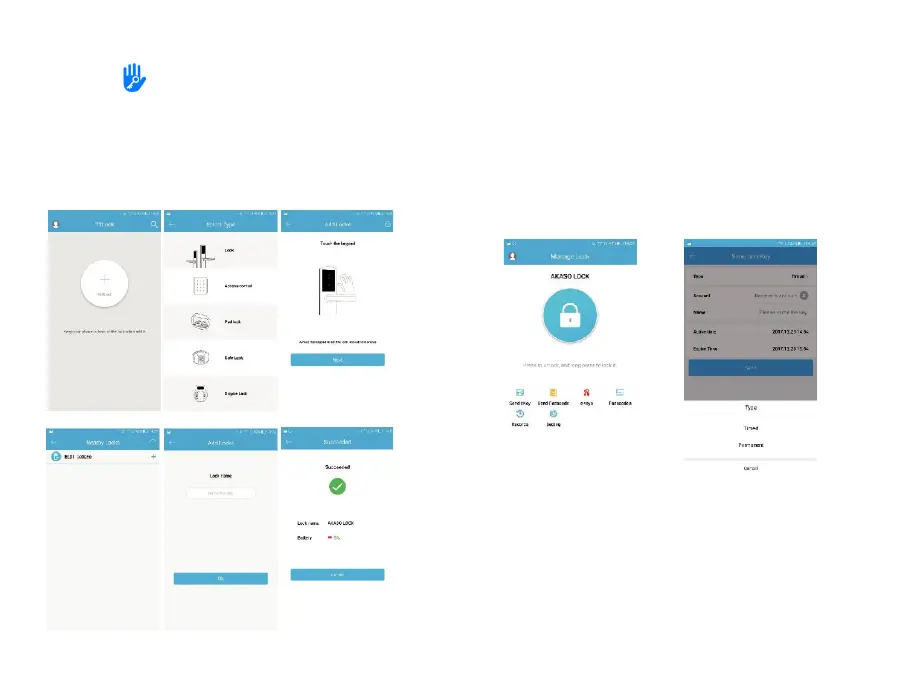
2. APP Connection
2.1 Turn on the Bluetooth on your phone
2.2 Open the APP. Then click “Add Lock” and Lock”.
2.3 Touch the touch screen button of the smart lock, the number
keys indicator light will be bright and click “Next” on the APP.
2.4 Find the smart lock name which starts with “xx_xxx” and click
“+”.
2.5 Rename the name of smart lock and click “OK”.
2.6. Click “Finish”.
3. APP Operation Instruction
3.1 Send eKey
eKey is a function for you to authorise the Admin rights to other
family members, who has downloaded the same APP in their own
phones. All the people who hold can control the smart lock. eKey is
highly suggested to be ONLY applied among family members.


 To Next Page