3
INSTALLATION:
LED INDICATOR DESCRIPTION:
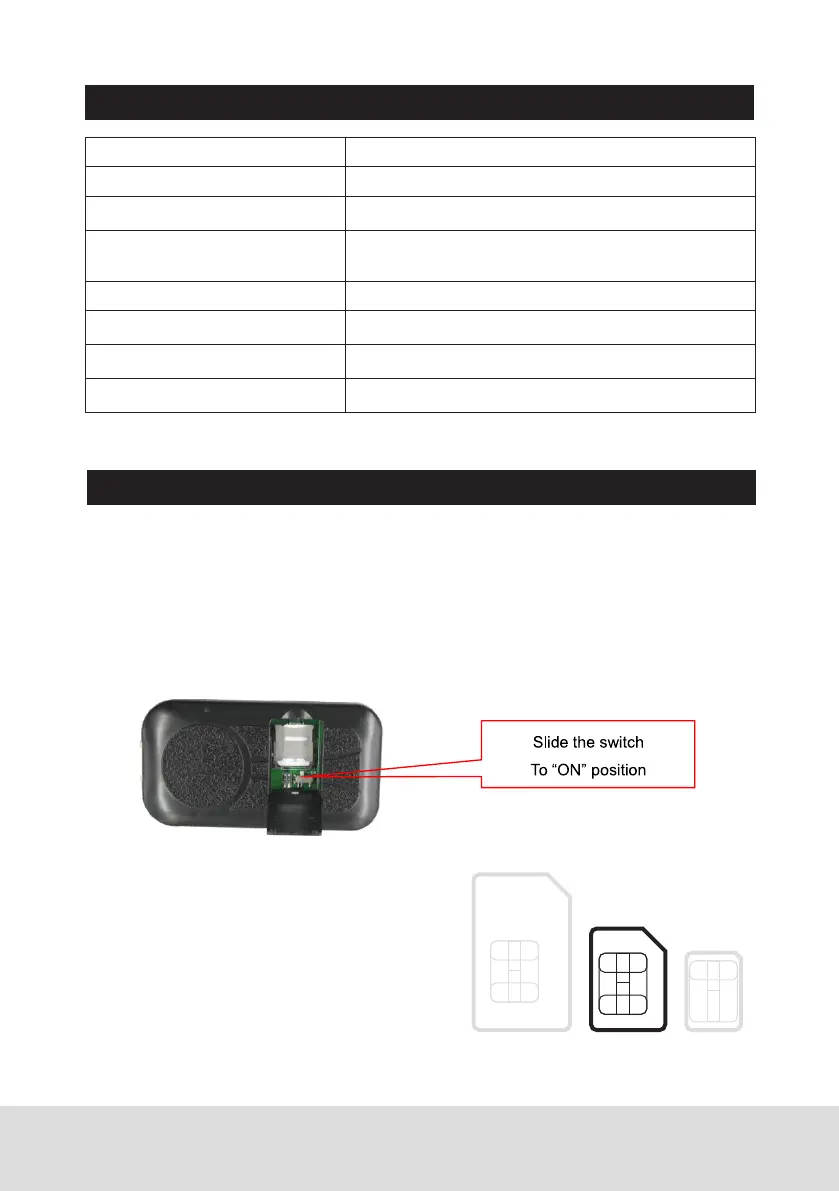
2. Install SIM Card (Micro SIM ONLY)
This tracker use 2G/3G/4G Micro sim card,
open the SIM card room cover, the SIM
card holder can be seen, slide the metal
cover to “OPEN” direction to open the sim
card holder, put the SIM card to the SIM
card holder (pay attention to the SIM card
direction), press and slide the metal cover
to “LOCK” direction to lock the SIM card.
GREEN LED Flash once 2G/3G/4G & GPS working well
GREEN LED Flash twice 2G/3G/4G working well and no GPS signal
GREEN LED Flash three times 2G/3G/4G & GPS working well but battery low
GREEN LED Flash four times 2G/3G/4G working well, battery low and no GPS
signal
GREEN LED ON continuously 2G/3G/4G searching network
GREEN LED OFF continuously Power off
RED LED Flash once uploading current tracking
RED LED Flash twice can not upload tracking now
Micro
SIM
1. Power ON / OFF
Open SIM card room cover with finger, slide the switch to the ON position
(please refer the following diagram), in the direction of the arrow , the tracker
will power on, if the tracker battery is low, the power & GND wire connect
to car battery is OK, after the tracker is powered on, the LED will flash, if the
Green LED flash once every 4 seconds, it means the tracker work well, please
refer the above detail LED flash indicator.


 To Next Page